
Why don’t you have a website yet?
Practically, every small and big business in the world has its website.
But what if you’ve built yourself a website and still failed to build the authority?
You might be disappointed by your site’s performance. And trying to figure out what went wrong.
However, it’s just like how you carefully pick your outfit for specific events.
And that’s exactly what I’m going to discuss in this extensive article on the best website builders.
Because if your choice of website is wrong, you’ll find monetizing, selling, and offering any kind of services difficult.
Not to mention getting ahead of your competitors as well.
So unless you like living in the caves, here are the best website builders that are mostly talked about.
1. WIX – Best for solo or small businesses
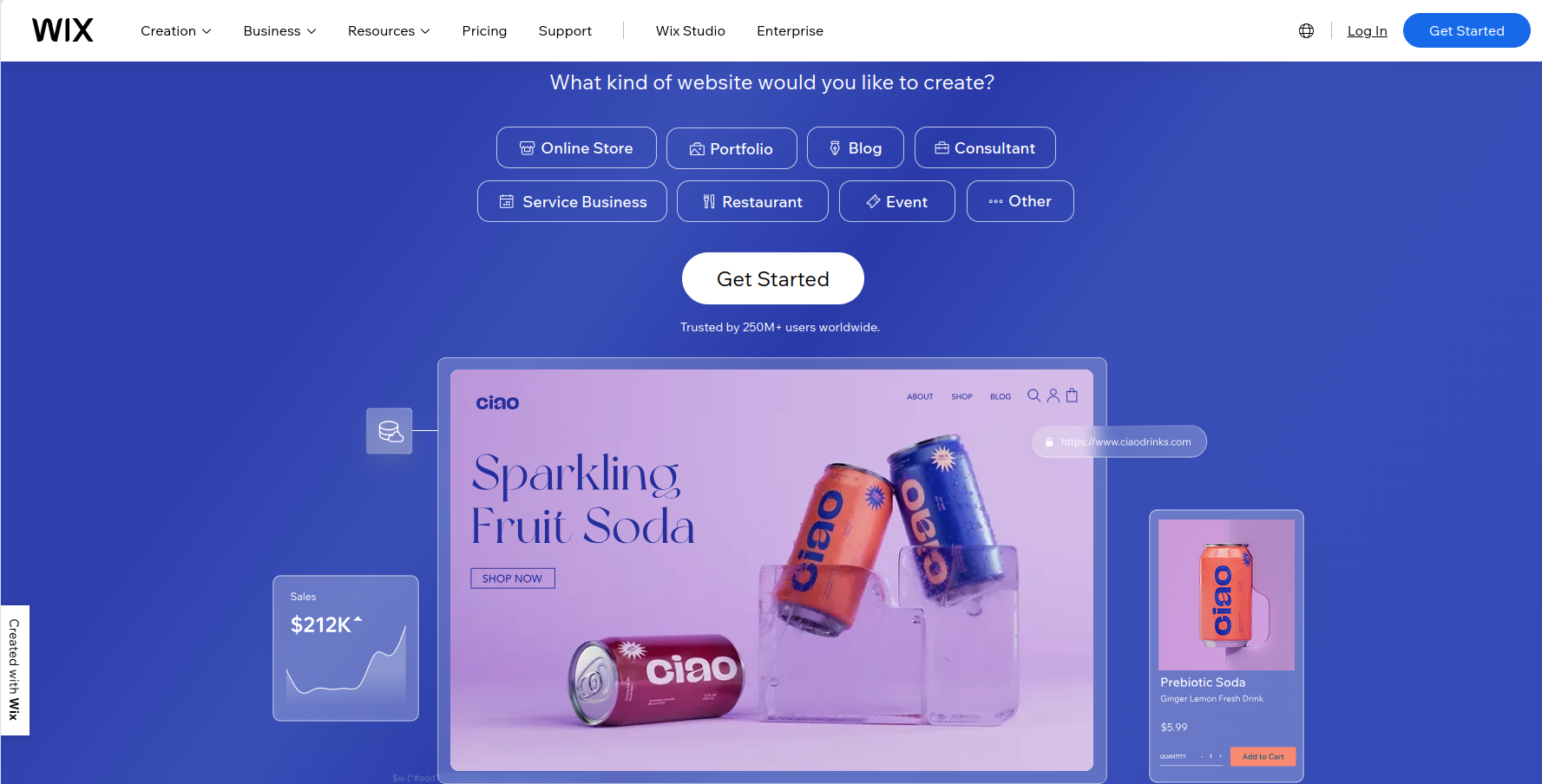
Building your business online? Go to wix.com and get your site up and running
Often interrupted by such ads on YouTube?
Most of us are on the same page then.
Not only WIX is a highly commercialized website builder. But also a no-code platform that understands not everyone is tech-savvy. Or ought to be.
WIX is, no doubt, a hot pick among independent business owners.
A self-hosted platform with ridiculously easy functionality. That spares you from the burden of building a website from scratch.
WIX is a good option if…
You’re a complete beginner. And looking to start a small e-commerce store or personal brand. Suitable for selling both physical and digital products.
WIX Key Features
- Drag-and-drop editor with over 900 customizable design themes.
- Accepts local currencies, and multiple payment gateways.
- Lets you sell both physical and digital products, streaming services, and online bookings.
- WIX’s proprietary AI, Artificial Design Intelligence (ADI) takes your preferences and designs a website for you.
- WIXStudio, a different service than the standard WIX, focuses on businesses. It’s powered by AI and offers advanced features.
WIX SEO review:
WIX features some basic built-in SEO tools. But they’re yet to offer advanced optimization tools – even on the higher plans.
However, you can integrate with Rabbit SEO which is an all-round marketing add-on. But it does come with a monthly subscription.
WIX marketing features – the good and the bad

Serious about selling items on WIX?
WIX’s standard plans may still work for solo brands. But for e-commerce, WIXStudio is the better option.
Better in terms of marketing automation, campaigns, analytics, and customer management. Even in the cheaper plans, you can take advantage of the Marketing Suite.
However, the Standard WIX plans below “Business Elite” are lackluster. Limited lead generation features, reporting, and design customization.
Website Design Capabilities

You can choose to drag and drop manually. Or let the ADI do all the magic.
However, if you want a bit more control over the customization, Editor X might be an option for you.
It’s a separate design tool. And it doesn’t come cheap.
But there won’t be a second thought if you’re serious about the overall UI and competitive advantage.
How good is the selling feature?
Thanks to the multiple currency and language support. The international selling capability with WIX is just unparalleled.
You can choose to sell your products. Or start a dropshipping business.
For example, you can integrate with platforms like Modalyst, Spocket, Printify, and Printful on WIX’s App Market.
WIX Pros and Cons
Pros:
- Tons of niche-focused design templates
- Drag-and-drop interface with customization option
- Ability to sell both digital and physical products, subscriptions and bookings
- Can add multiple collaborators to manage the website
- Offers alternate WIX Studio platform with advanced development tools
Cons:
- Unable to switch to a different theme
- Page speed issues in heavy online stores
Pricing: Is WIX the best website builder for beginners?
Standard WIX pricing:

WIX Studio Pricing:
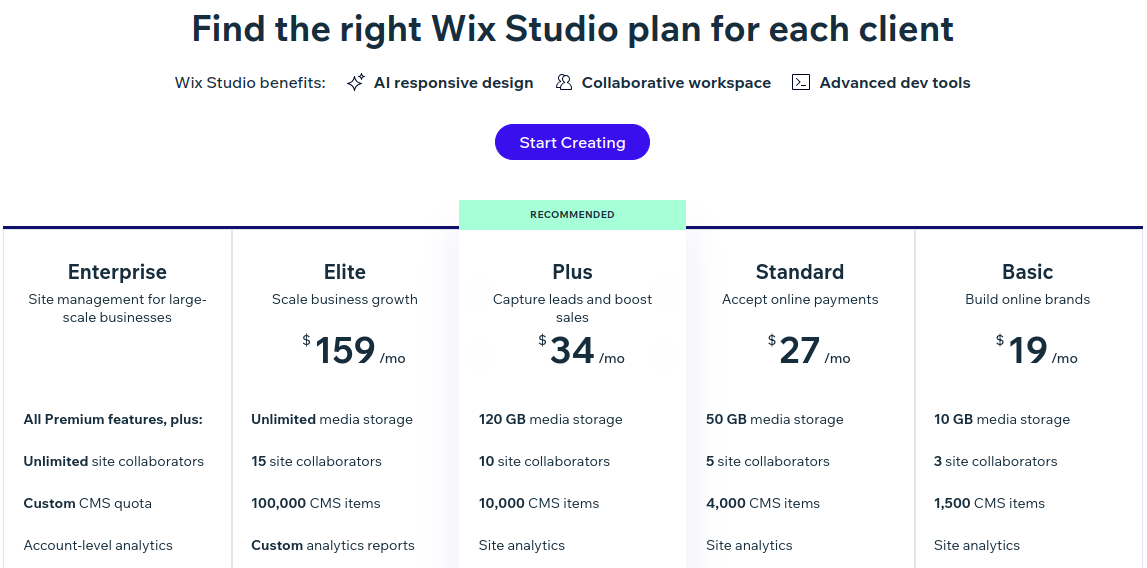
WIX is tailor-made for beginners and non-tech-savvy users.
The lack of so many features on the Basic plan may disappoint you. However, the Standard plan doesn’t come that cheap either.
2. Shopify – Leading e-commerce website builder

Because you wanted to be an online merchant.
Because you were looking for an online extension to your existing retail.
Because you wanted to market and sell across the world.
Therefore, to fulfill the aspirations of sellers like you, Shopify was founded.
There are so many reasons why Shopify is the market-leading platform.
Besides the robust set of features, there’s an amazing community of sellers.
It’s fully hosted. It’s well-optimized. Yes, it’s pricey.
But for everything you’ll get, there will be no room left for complaining.
Shopify is a good option if…
You’re serious about your online store. If high-traffic, large-scale online selling, and scaling your e-commerce business are your goals.
Shopify Key Features
- Over 7000 free and paid plugins on Shopify app store
- Multichannel selling capability to use Shopify for both online and offline selling
- Comes with freemium design templates with customization capability
- Built-in marketing automation tools with store branding options
- Wider outreach as it supports multiple languages and over 100 payment processors
SEO review
Built-in SEO features are pretty basic. It’s not even a CMS platform. So blogging is basic too.
Rather the best option is to go for a plugin.
For example, Avada, SEO Optimizer, and SearchPie offer both free and paid plans.
Shopify marketing features – the good and the bad
Shopify’s SEO may have failed to impress you. But marketing won’t. Because it offers you best-in-class marketing automation.
You can create a customized brand for your store. Keep accountability of campaigns. And categorize your customers into groups.
There are way too many bells and whistles to talk about.
But what I found interesting is its multichannel support.
Because Shopify lets you sell your products not only across Facebook and Instagram pages. But also Amazon.
Website Design Capabilities

Shopify features only 12 free themes. And over 150 premium themes that are pretty expensive. Ranging from $140 to $400.
Either way, you’ll have all the creative freedom to customize. And give your unique touch.
Premium themes come with well-optimized UI and fast-loading pages that can take on busy day loads.
How good is the selling feature?
On Shopify, you can include physical and digital products, bookings, memberships, and even ticket bookings – all together.
But the best part – Shopify supports over 100+ payment partners across the world.
Even accepts a wide range of cryptocurrencies.
You can also ask for the POS service – as a software or hardware device.
As far as supplier service is concerned, you won’t be limited to choices.
You can easily integrate product providers, print businesses, and dropshippers on its App Store.
Shopify Pros and Cons
Pros:
- Robust set of marketing automation features
- Unparalleled global outreach and support in multiple languages
- Options to integrate dropshipping service
- App Store offers tons of integration option
- Can sell physical and digital products, bookings and memberships
Cons:
- A bit pricier plans
- Need to be Shopify pay user to access multi-currency capability
Pricing: Is Shopify the best website builder for beginners?

If you’re starting out as a beginner with a passion for selling online, the Basic plan is the best choice then.
But to explore the peak potential, it’s better to have a small team and get started with the Shopify plan.
3. Sellfy – Best merch store builder for creators

By not having your own line of products, you might be missing out on a great revenue stream.
You might have built an authority. However, as a creator, you might never get the taste of your follower’s loyalty.
But if you’re serious about it, Sellfy can take your personal branding to the next level.
The community around this platform is not only based on online courses, designs, music, and filmmaking. But also makes it a unique choice for ebook writers, podcasters, audiobook authors, or photographers.
On top of that, Sellfy features print-on-demand (POD) to make the fan experience even better.
However, if you see this as a standalone store, there is no point in using it.
Sellfy is a good option if…
You’re already a content creator or social media influencer. Sellfy serves as a cool merch store for your followers and fans.
Sellfy Key Features
- Display your products on YouTube by embedding them on the descriptions and end screens.
- In-house print and shipping facilities for POD products like t-shirts, hoodies, hats, and mugs.
- Videos-on-demand or streaming feature comes with piracy control.
- Unique access links with limited download attempts to prevent unfair content sharing.
- Easy to integrate Sellfy as a merch store to your existing WordPress or WIX stores.
SEO review
Sellfy’s SEO feature is only on the paper.
Technically, your site is meant for promotions and branding among your existing followers. But not for ranking on Google.
So without having a social presence, selling and ranking on Sellfy just makes no sense.
Sellfy marketing features – the good and the bad

As I said about promotions and branding, Sellfy does a decent job.
You can post ads using Facebook and Twitter ad pixels. And see how they perform.
It’s great to have up to 2000 free email marketing credits on the Starter plan.
But the plan misses out on so many marketing features. Such as cart recovery automation, and affiliate programs.
What feels miserable is paying over $20/month and still seeing Sellfy branding tagged on your site.
Considering some platforms offering white-label branding at much lower pricing, Sellfy’s Starter plan is disappointing.
Website Design Capabilities

Comes with only 6 design templates with basic drag-and-drop widgets. But they’re all well-optimized and fast-loading pages.
Don’t expect many customization options, though.
Also, many Sellfy sellers rely on Canva to design their POD products.
At that price point, all the Sellfy plans should have included a simple built-in graphics editor.
How good is the selling feature?
Unlike an e-commerce store, selling via Sellfy is a direct approach. You can either embed your offerings on YouTube and social media. Or use the power of email campaigns.
The starter plan, however, lacks upsell and cart recovery features.
But when it comes to payments, Sellfy supports PayPal, Stripe, and a range of standard banking cards.
Sellfy Pros and Cons
Pros:
- Built-in print-on-demand service
- Upload and sell unlimited digital content
- Can sell subscription services as well
- Control over downloads Content protection against piracy
- Direct selling cards on YouTube and social media
Cons:
- Pricier plans unless you subscribe for a 2-year commitment
- The starter plan lacks important features
- A limited number of themes and integrations
Pricing: Is Sellfy the best website builder for beginners?

There used to be a free plan a few years back.
However, it’s scrapped now while staying on the same price tag on all the plans.
Considering cheaper subscriptions on yearly and biyearly commitments, it’s a tricky choice for beginners.
4. Square Online – For physical stores going online

Started off as a payment gateway, Square Online is now a full-fledged website builder.
The platform is changing the way you can expand your retail business online.
Skeptical about moving your store online?
That is why Square Online comes with a $0 plan to test the waters. And see if this platform can help you multiply profits.
No matter if you’re a café, grocery, utility, or professional service provider.
Square Online’s payment system seamlessly syncs with your inventory.
That gives your customers a fulfilling shopping experience. And you have a peace of mind.
Square Online is a good option if…
You’re looking to build a website for your retail business. You can also sell professional or subscription-based services.
Square Online Key Features
- Comes with in-house POS systems that integrate with both online and offline stores.
- The $0 plan covers most of the marketing, orders & fulfillment, and cart & checkout features.
- Community page where you can connect with other like-minded sellers to learn and grow together.
- Features a native CRM tool that helps you fetch your customer’s data to ease your business strategy.
- Easy to integrate with other marketplaces such as WooCommerce, WIX, and more.
SEO review
Even on the free plan, you can get your entire website indexed.
While blogging and on-page SEO help you keep every product page fresh and optimized.
With off-page features, you can share your products across social pages. And keep the traffic to your online store alive.
Square Online marketing features – the good and the bad
The built-in email marketing feature is great.
From creating automated campaigns to customizing lead-generation forms, you’ll have all the luxuries in one place.
You can even get your POS system synced to your marketing campaigns. And let it shoot offer-hooked emails and text messages to your audience.
However, if you’re on a free plan, your customers can’t receive personalized item recommendations and offers.
Even the lack of abandoned cart recovery on a free plan is disappointing.
Website Design Capabilities

Not really known for glitzy themes. But you can go on customizing free templates using a smooth drag-and-drop site builder.
Unless you’re on the free plan, you can choose from 24 well-optimized premium themes – based on your business background. And will be able to access its stock library.
How good is the selling feature?
Square’s paid plans come with chip-based cards, swipe-based, and wallet-based POS. That seamlessly integrates with both physical and online stores.
Besides Square Pay, the platform also accepts many other international payment methods.
Square Online also lets you run a dropshipping business using platforms like Printful or Spocket.
Square Online Pros and Cons
Pros:
- Affordable pricing plan with a free subscription option
- Free plan comes with orders & fulfillment and cart & checkout features
- Easy to link your store POS and website
- Easy to set up and configure online store
- Dropshippers and POD integrations are available
Cons:
- Limited SEO and theme options
- Charges extra commissions on sales (even on the Premium plan)
Pricing: Is Square Online the best website builder for beginners?

Square’s free plan could be a good starting point if you’re taking your store online for the first time.
But to avail the benefits of sales and optimization, you should go with the Plus plan.
5. Duda – SaaS and other professional services

Imagine you have a website builder that helps you create professional websites using AI. And to make some changes, your client asks you for access.
But then they mess it up and revert to you. And you both collaborate back and forth to deploy the website successfully.
Duda is exactly the platform that brings such an idea into reality.
Most of you may not be familiar with Duda. And not everyone really needs it.
Unless you are a small development team or a startup looking for professional services.
With the power of generative AI, you can achieve something that experienced developers build using WordPress. But in a much less time.
Duda is a good option if…
You are a small team of web professionals looking for a platform with collaborative professional services.
Duda Key Features
- The generative AI is based on OpenAI which lets the editor customize every aspect of the website appearance.
- Features AI Dynamic pages that help you build multiple pages with the same layout but different content. Such as landing pages, catalog items, real estate listings, etc.
- Provides both pre-designed templates and a full-fledged code editor called DudaFlex.
- Team Collaboration feature that helps with content sharing, client communication, and feedback.
- Client billing streamlines the payment operations by automating the invoicing depending on one-time or recurring payments.
- All plans include web hosting provided via Amazon Web Services (AWS).
SEO review

SEO tools are nicely baked into Duda’s website builder.
You can let the AI assistant complete the mundane tasks of filling up metadata and descriptions. While complying with fair SEO practices.
Without having you spend time brainstorming about it using multiple tools.
Duda marketing features – the good and the bad
While AI does most of the heavy lifting in optimizing the site. It falls short of built-in marketing tools.
Duda offers marketing materials made by experts. That can help you leverage the power of branding and personalization.
However, only available on the While-level plan which is rather expensive.
But you can integrate Mailchimp, Google Analytics, and social sharing on any plan.
Website Design Capabilities

Duda comes with about 100 professionally-designed and niche-specific templates.
In addition, you can leverage the power of its in-house editor, DudaFlex. You can create any type of design that comes to your mind.
But what interests me the most is the site personalization feature. Thanks to the AI assistant!
You can create automated triggers based on the time of your visitors, their geolocation, ad campaigns, and even more actions.
Turning your ordinary lifeless page into a conversion-optimized interface.

How good is the selling feature?
Duda isn’t limited to options when it comes to selling online. Although it’s geared towards SaaS or professional services. You can sell physical and digital products, memberships, or even bookings.
However, to build an e-commerce site, you’ve to pay an extra subscription starting at $8/month.
But the good thing is, there is no transaction fee on any payment gateway from their end.
Duda Pros and Cons
Pros:
- Powerful AI-based website builder
- About 100 pre-designed themes and tons of premium stock images
- Robust website editor with customization capability
- Collaboration and client management features
- Comes with a wide range of integrations
Cons:
- White labeling is not available on the cheaper plans
- Doesn’t offer a free plan
Pricing: Is Duda the best website builder for beginners?

Duda isn’t built for beginners or individuals.
But if you’re a team of professionals looking to start SaaS business, Duda could be your go-to choice.
6. Zyro – AI-enabled website builder

There is no measure of how much time AI could save. While laying out an equally human-esque business-ready website at your disposal.
Zyro’s website builder is still new. And yet to make a dent in the digital marketplace.
But the range of AI features it offers can come in handy. Especially when you’re looking for a cheaper AI-enabled alternative to Duda. That you can use for mundane tasks.
So that you focus more on your creative abilities. And keeping up with your audience.
Zyro is a good option if…
You’re a freelancer or startup looking for an affordable AI-powered platform to spend less time building websites.
Zyro Key Features
- Comes with a bundle of AI tools including AI writer, Title generator, and slogan generator to create a catchy tagline for your campaigns.
- Time-saving features like AI Image Upscaler, background remover, and resizer.
- Deep audience insights using AI heat maps such as the number of clicks, page actions, scrolls, and more.
- Over 100 optimized design templates with complete customization capability.
- Built-in e-commerce builder with CRM, inventory, and order management features.
SEO review
Although Zyro packs in built-in SEO tools, it still feels very basic.
Thanks to the AI text generators. That only helps you generate meta descriptions. But saves you a lot of time.
And yes, it does adhere to the right SEO practices.
Zyro marketing features – the good and the bad

Zyro really shines with built-in marketing and AI tools.
The marketing suite can help you drive traffic and get conversions. Which includes social media integrations, Google Analytics, AI heat maps, and of course, email marketing automation.
But what I don’t like is that the email marketing and cart recovery automation are only accessible to Advanced users.
Website Design Capabilities

It’s all fun and games when you have an AI site builder that can help you generate sites without much effort.
With over 100 themes of diverse categories, you can go on with anyone. And let the AI do the magic.
However, the level of customization is pretty limited. You may still compromise with that.
But what’s bad about it is that you just can’t switch templates once you’re done with the contents.
How good is the selling feature?
Selling features on Zyro are impressive. You can create an e-commerce site. And integrate dropshipping service as well. You can sell across social channels too.
But to add to your surprise, you’ll also have inventory, shipping, and tax management features.
Zyro also accepts universal payments including PayPal, Stripe, Kevin, and standard bank cards.
Zyro Pros and Cons
Pros:
- Affordable pricing plan
- AI-based automated workflow for design and content
- Over 100 diverse themes with customization capability
- Ability to sell both digital and physical products
- Regular feature updates to keep up with the changing dynamics of AI
Cons:
- Domain included only for a year
- Issues with switching the theme once content is published
Pricing: Is Zyro the best website builder for beginners?

Zyro comes with cheaper introductory plans. A bang for the buck for beginners.
So after one and two years respectively, the pricing will be $5.99/month for one-year commitment and $10.98/month for two years commitment.
7. Format – For Pro Photographers, videographers, and artists

Using just another website builder for your portfolio may never get you to the right people.
Your catchy one-liners may still reward you with some clicks.
But then your potential client finds more texts than the multimedia. Or an unprofessionally arranged portfolio. Where your great captures look average and untidy in the clutter.
They would simply leave your site by the next blink.
Format, therefore, takes show-don’t-tell to the next level. That gives you an identity. And to them clarity in their hiring decision.
Format is a good option for…
Stock photographers, videographers, and creatives with skills in Photoshop, illustration, and any kind of digital and physical arts.
Format Key Features
- Supports high-res images, videos, and digital art file formats from RAW, Adobe, or any digital design tool.
- Comes with web hosting along with in-house video hosting (unlike YouTube and Vimeo).
- Client-friendly downloads, watermark protections, and warning controls to avoid illicit attempts.
- Format offers 2 ways to sell your work online:
1.Format Store – where you can sell products from existing inventory such as physical prints and digital downloads.
– No fees or commissions on the Format store.
– Requires your own inventory and shipping service.
2.Format Prints marketplace – where suppliers handle the on-demand printing of products and ship directly to the clients from their production facility.
– Charges commission between 5%-15% based on the subscription level.
– Don’t have to worry about stocking inventory and shipping the products.
SEO review
The SEO settings are pretty straightforward. On Format, you don’t have to bother about content.
However, a blogging feature can come in handy.
Adding captions and image descriptions can not only help your visitors to understand your artwork. But help your images get indexed properly.
Format marketing features – the good and the bad

Comes with a rich social sharing feature where you can share your work across Facebook, Instagram, Twitter, LinkedIn, Pinterest, and more. Even YouTube and Vimeo.
Also features built-in Google Analytics to see how your work receives attention.
In addition, the pop-up feature offers a cool and personalized way to get sign-ups for email newsletters.
What I don’t like is the extra charges for the branded email feature. Costs $72 per year.
Website Design Capabilities

Features pre-designed and responsive templates. Specifically tailored for the photographers and artists. Considering how niche-specific Format is, they are all created by award-winning designers.
Also features Adobe Lightroom integration, which is a great tool for photographers.
Overall, a clean interface with the right proportion of design, typography, and other visual elements.
Setting the style and tone like an exhibition by avoiding any kind of distraction.
How good is the selling feature?
As described in the features, Format offers you 2 ways to sell online: Format Store and Format Prints Marketplace.
On top of that, you can also include merchandise for your audience.
However, for the Basic plan users, there is no such option. Limited to only digital items.
Format Pros and Cons
Pros:
- Supports a wide range of file formats in high-resolution
- Range of design templates and ease of customization
- Managing and sharing your work securely with clients
- High-quality downloads without sacrificing the image quality
- Affordable pricing plans
Cons:
- Basic plan lacks several features considering the price gap with the Pro plan
- Pro plan comes with very limited store products compared to the Pro Plus plan
Pricing: Is Format the best website builder for beginners?

Basic plan lacks a lot of features.
So for a few more dollars per month, the Pro plan seems to be the best choice for beginners.
8. Podcastpage.io – For Beginners and Pro podcasters

Why website when you have podcast servers to publish your episodes on?
Because some of the biggest problems new podcasters face are low viewership and downloads. Consequently, a low scope of monetization.
With so many podcast influencers out there, it’s hard to compete on those servers alone.
But then there is a platform like Podcastpage. Specifically designed to help you grow and monetize your podcasts.
Note that, Podcastpage isn’t a directory like Spotify or Apple podcast. Instead, a website hosting that gives you a professional identity.
And yes, your audience doesn’t necessarily have to stick around your site.
They can always access your episodes via any supported directory once they have subscribed.

Podcastpage.io is a good option if…
You’re looking to boost your online presence. A platform for both beginner and experienced podcasters.
Podcastpage Key Features
- Supports over 40 directories or podcast servers including Spotify, Apple Podcast, Spreaker, and more.
- A platform built around RSS feed that auto-publishes your episodes on those supported directories.
- Features importable podcast reviews, clickable timestamps in the show notes, transcripts, subscribe, and sharing options.
- Receive both comments and voice messages on your episodes from your listeners.
- The business plan comes with visitor analytics for each episode.
SEO review
Why does a podcast-only site need to have built-in SEO elements?
Podcastpage doesn’t take SEO and blogging for granted.
Those transcripts, show notes, or any helpful guide not only complement your episodes. But also give you authority.
So that your potential guests are assured that they can search you online before agreeing to the interview.
Podcastpage marketing features – the good and the bad
A podcast website doesn’t require a lot of marketing tools. But does require affiliate links if you’re looking to monetize. Podcastpage makes it easy to create custom short links that redirect your audience to your affiliates.
I expected to have built-in email marketing and social sharing features. However, you’ve to integrate them separately.
But at least, you have a built-in auto-posting feature on Twitter. You can also embed an audio player on top of it.
Website Design Capabilities

Podcastpage features only 9 template designs and 20 something customizable widgets. They are all well-optimized for smartphones.
But the most striking feature is the Fusebox. It’s a cross-platform podcast audio player that can be customized.
You can change the colors, set the audio controls, and place the buttons of your choice on display.

How good is the selling feature?
Selling products or services isn’t something you can expect on a podcast website.
Yet you can add a little merch section and membership plans for your listeners. The integration is not straightforward, however.
Podcastpage Pros and Cons
Pros:
- Makes it easy to manage multiple podcasts from the same website
- Easy to import episodes to your site to keep it synced and updated
- Supports both audio and video podcasts
- Audience can subscribe on the website and listen via choice of podcast directory
- Automatically syncs your podcast episodes
Cons:
- A limited number of themes and customization capability
- Should have a built-in merch store
Pricing: Is Podcastpage.io the best website builder for beginners?

Starting plan seems to be decently priced for beginners.
Unless you’re starting out as a small team, the Podcaster plan is a perfect choice on a long-term basis.
9. GoDaddy – Best for freelancers or indie marketers

GoDaddy is not only the most commercialized domain registrar in the world. But also a website builder platform.
Although newbies often think of hosting WordPress sites upon GoDaddy. The tricks and treats GoDaddy has to offer are worth looking at.
Unlike WordPress, you’ll find all the important features built-in. So that you worry less about plugins. And enjoy your experience building your first website.
Thanks to its AI-powered editor that does all the heavy lifting for you.
GoDaddy may not be the best or most powerful website builder out there. But its page response time is hard to beat.
Godaddy is a good option if…
You are a freelancer, a digital marketer, or simply a blogger. Also a budget alternative for an e-commerce store.
Godaddy Key Features
- Artificial Design Intelligence (ADI) helps you build a customized and responsive website in minutes.
- Comes with a full-fledged digital marketing suite to build a buzz online and rank on the search engine.
- Godaddy’s Backup feature protects you against unlikely attacks or website crashes.
- Features unlimited storage and monthly data transfers on all the plans.
- Best-in-industry technical support team with better response time than most of the website builders.
SEO review
The SEO feature is pretty standard. But the templates it offers are all optimized with good sitespeed and without any bloats.
It’s all a neat and clean interface. So that you don’t scratch your head around ranking your site.
However, it is sad to see that you can’t optimize your site on the Basic plan. But it makes no sense to have analytics features either.
Godaddy marketing features – the good and the bad
At first glance, you’ll notice that GoDaddy is a marketing-focused website builder. That brings you the luxury of marketing automation even on the Basic plan.
If you go higher in the plan, you’ll enjoy creating branded content on GoDaddy’s built-in studio. And create conversion-optimized pages to suit all your marketing needs.
However, considering the price gap between the Basic and Standard plans, the email marketing sends/month is disappointingly low.
And even on the higher plans, professional email is free only for 1 year.
Website Design Capabilities

GoDaddy features over 100 well-optimized templates.
It’s also good to know that you can switch between the themes without worrying about building from scratch.
However, those templates are not flexible and customization-rich.
You can also rely upon its ADI editor to quickly build your website. But you still need to maneuver from your end.
Or else, you’ll end up with a design strikingly similar to others.
How good is the selling feature?
The ecommerce plan is set on a different plan. And the pricing is pretty competitive.
But it’s good to see that you can list up to 5000 products.
Along with flexible shipping options and flexible payment gateways. And the ability to sell on Amazon and Instagram as well.
Godaddy Pros and Cons
Pros:
- Affordable pricing plans
- Can be used for multipurpose use cases
- Unparalleled customer support experience
- Sell digital and physical products and bookings
- Comes with an auto-backup feature
Cons:
- Lacks advanced design customization
- Basic plan lacks SEO and social sharing
- No integration options
Pricing: Is Godaddy the best website builder for beginners?

GoDaddy has always been geared towards beginners.
However, considering a small price gap, Premium seems a better choice to avail full benefits of marketing.
10. Samcart – Geared towards selling online courses

Have a knack for teaching online? And earn a decent side income without sacrificing your odd job?
Samcart is exactly the platform where you can build a course website. Upload your content. And market them to your niche audience.
You can also use a unique simple triple formula to multiply your sales – which you’ll learn down below.
Indeed there is a potential audience for almost any skill or experience you have.
And by not having your lessons out there, you’re missing a big opportunity.
Samcart is not only a launchpad for your online courses. But also a way to build up your brand awareness and online authority.
Samcart is a good option if…
You are a teacher, content creator, or any artist looking to tap into your niche audience without being tech-savvy.
Samcart Key Features
- Creator U program provides a comprehensive set of live training, workshops, templates, and untold strategies for successful course selling.
- Helps you gain audience insights with revenue optimization features like cart recovery, pixel tracking, and advanced reporting.
- Unique 1-page checkout with a simple triple formula including orderbump, upsell, and cross-sell to improve average order value.
- Generate more sales with an Affiliate center, where you can designate your sales team with a special tracking link.
- Easy to set up and organize course contents like quizzes, worksheets, and downloadables.
SEO review
Samcart comes with pretty basic SEO settings.
Unlike optimizing the entire store, you can optimize only 1 course or page at a time.
You’re free to create multiple product pages, though.
It also lacks a built-in blogging tool. Which means you’ll need to integrate WordPress.
Samcart marketing features – the good and the bad
You can do so much with the off-page marketing.
As simple as sharing one-page funnels across social media. And drawing your audience into a new buying experience on the spot.
Speaking of social media, you’ll be amazed to know its marketing tactic on Facebook.
For instance, you can let Facebook create a look-alike audience based on your existing followers. And then run your campaign.
Samcart also provides great control over how you could select affiliates to promote your product.
Now the bad part.
Every good thing about Samcart’s marketing features appears on the Grow plan and beyond. Even abandoned cart recovery is missing from the starting plan.
Website Design Capabilities

Comes with a simple drag-and-drop interface. Customization and theme options are pretty limited.
However, they are all optimized for fast loading times.
It’s easy to organize lessons as per tiers. And add layers of interactivity to your course such as
quizzes, worksheets, and downloadables.
How good is the selling feature?
Samcart features a game-changer simple triple formula.
With the best use of order bumps, upsell, and cross-sell, you’ll have no measure of profits.
Based on how you lay them out before checkout, after checkout, and during the lessons respectively.
On top of it, you can sell course bundles too.
Note that the platform isn’t built to work like an e-commerce store.
However, you can sell only one physical product at a time.
Samcart also supports a wide range of currencies and payment processors.
Samcart Pros and Cons
Pros:
- Best-in-class sales and conversion features
- A limitless number of videos and digital file uploads
- Flexibility to build a number of product pages
- Seamlessly organize and manage course enrollments
- Easy to switch between live and sandbox mode
Cons:
- Expensive pricing plans
- Important selling features and integration not in the starter plan
- Not really for physical products (can sell only 1 product, though)
Pricing: Is Samcart the best website builder for beginners?

Sounds very expensive for beginner content creators.
But if you’re already a tutor or an earning creator, the Launch plan seems good to go.
11. Webflow – Most Flexible and designer-friendly editor

Doesn’t matter if you’re a designer, a developer, or an absolute beginner.
Webflow is a rare combination of a no-code editor and an advanced website builder.
The editor is both visual and interactive. That adds to the designer’s delight.
You don’t necessarily need to know what’s happening at the code level. Webflow truly understands the perils of missing syntax or code errors.
And in general, it’s so much time-consuming to get things fixed. This is where Webflow’s automated code correction saves your day.
Not just the visual editor. But the entire feature stack is worth looking at.
Webflow is a good option if…
You’re a designer and looking for a flexible website builder without getting disappointed by your lack of development skills. Same for a developer.
Webflow Key Features
- Visual editor gives you both visual and code-level customization flexibility.
- Automated syntax structuring that generates code in real-time as you tweak around visual elements, margins, and layout.
- Robust CMS with built-in SEO, typography, and color customizations.
- 3D animation along with interactive features by adding unique animation presents.
- Comes with built-in hosting with fast response time.
SEO review

Webflow’s CMS is not easy to get along with. But feels more robust when you’re coming from WordPress. SEO features are baked right into it. And you won’t feel the need to depend on plugins.
And thanks to Webflow’s clean-code ecosystem. The response time looks good on Google’s page speed insights.
However, it’s disappointing to see that the Basic plan doesn’t have any of the CMS features.
Webflow marketing features – the good and the bad
Webflow lacks marketing and automation features. But thanks to its App Store. You can integrate Mailchimp and many other apps that fit your needs. Also, the App Store houses more integrations than what they had a few years back.
Now when it comes to e-commerce, Webflow’s marketing features feel a bit similar to Shopify. However, you can’t list a wide range of products. Only meant to focus on specific products.
Website Design Capabilities

Webflow’s editor has the flexibility of a gymnast and the performance of an athlete.
At first glance, you’ll find yourself drawing a contrast with Photoshop. That how aesthetically similar they are.
Webflow names it “The box model”.
But if there is something surreal about Webflow, it is the huge library of templates. Pre-designed for almost any use case you could think of.
The 3D elements and interactive animated presets are yet another amusements. Especially when your business is built around designing.
Not just design, but also known for great typography and use of colors.
How good is the selling feature?
They offer e-commerce on a separate tier of plans. But they have a big pricing gap.
Unfortunately, you can sell digital products on Webflow.
But it’s good to see that they have a global payment system with automated tax calculations.
Webflow Pros and Cons
Pros:
- Intuitive visual editor with flexible design customization
- Robust CMS editor with built-in SEO
- Comes with 3D animation and interactive features
- Active and growing community forum
- Comes with a free plan
Cons:
- Lacks built-in marketing features
- No CMS feature in the Basic plan
- Can’t sell any digital products
Pricing: Is Webflow the best website builder for beginners?
Webflow General pricing plan:

Ecommerce pricing plan:

Although Webflow’s general plans seem competitive, beginners can bet on the CMS plan.
However, if you’re looking to start your first ecommerce site, the plans are rather expensive.
12. WordPress – Most popular website builder

While WordPress is a common buzzword among web professionals. Some of you may mistake it for WordPress.com.
Though the relationship between them is symbiotic.
So let’s make it clear now.
WordPress is an open-source website builder that isn’t self-hosted. But you can pair it with almost any global domain registrar and hosting provider.
Although the builder doesn’t cost you anything. Pretty much everything is fueled by plugins.
Comes with a learning curve. But also a lot of room for customization.
And then we have WordPress.com. A self-hosted site owned by Automattic. Whose president is also the co-founder of open-source WordPress.
The platform comes feature-packed already with different pricing plans. You can pick what fits your needs. And get started without worrying about the plugins or hosting.
With WordPress, you have no measure of what you could achieve personally and professionally.
But here, I’m rather going to shed light on WordPress.com. And see the feature stack they offer.
WordPress is a good option if…
You’re a complete beginner or an experienced developer who enjoys open-source platforms. Relevant for any individual or business for almost any use case.
WordPress Key Features
- Powerful CMS with a flexible interface that makes editing, organizing, and publishing easier.
- Features unlimited premium themes on Explorer plan and above.
- Advanced marketing and e-commerce features on Entrepreneur plan powered by WooCommerce.
- Unparalleled community members across the world including developers, designers, marketers, entrepreneurs, and hobbyists.
- P2 comes as a new feature which is an alternative to emails or team management tools to make collaboration easy and secure.

SEO review
There is no denying the fact that most sane bloggers love WordPress.
The built-in optimization tools come with amazing SEO capability.
But only for the Creator plan and above.
Unfortunately, cheaper plans lack built-in optimization.
However, you can go with the most recommended plugins like Google Site Kit and Yoast SEO to power your optimization.
WordPress marketing features – the good and the bad
Email marketing and social sharing are nicely baked into all the plans.
However, advanced marketing automation features can be found on the Entrepreneur plan – powered by WooCommerce.
But thinking about an e-commerce website on a cheaper plan?
You’ve to be at least subscribed to the Creator plan. But then, you’ll end up paying for some of the marketing plugins.
Website Design Capabilities

WordPress CMS houses unparalleled capabilities.
You can choose to work with Block or Classic editors. Or integrate a drag-and-drop editor like Elementor.
Either way, you have the flexibility to modify the code.
What makes WordPress special is the abundance of themes. You can find some free ones. Or get the paid themes from 3rd party sites to save your time.
But you’ll have access to unlimited premium themes from the Explorer plan.
You can also choose to include parallax scrolling effects or some fancy animation effects. But also make sure to not hamper the page response time.
How good is the selling feature?
You need to have a Creator or Entrepreneur plan to avail the benefits of selling online.
But the good thing is that there is no commission fee for standard WooCommerce payments.
Talking about payment processors, you can choose to include any number of processors for better accessibility and outreach.
WordPress Pros and Cons
Pros:
- Open-source website builder
- Unlimited premium themes without any 3rd party
- Features help desk – via email and live chat
- Free learning resources within the website and across the internet
- Strong and ubiquitous community
- New team collaboration feature – P2
Cons:
- Very low media storage on Starter and Explorer plans
- Additional storage is pretty expensive when billed annually
- The entrepreneur plan should have a minimum storage of 100GB
Pricing: Is WordPress the best website builder for beginners?

WordPress has always remained a beginner-friendly platform.
So if you’re planning to build your first website, Starter and Explorer are the most affordable options.
Final Words
I hope you’ve found the website builder of your choice by now.
A step towards generating passive income online.
But make sure to consider some deciding factors before you take the next steps.
For example, if e-commerce is your goal, Shopify is second to none.
Is that just content marketing or blogging you’re interested in?
You’ve got a lot of choices… including WordPress. But consider your budget before you go on paying for advanced plans.
Maybe you’re a digital artist. And looking to sell your artwork.
Then you should choose a website that helps you lay out your digital products professionally. And market it extensively.
Okay, you got the point! Now, leaving this article up to you.


 A better way to manage projects and clients for freelancers
 Get through busy days like a breeze with Reclaim.ai