
European regulators issued $1.42 billion in GDPR fines in 2025.
TikTok alone paid $53 million in Ireland.
On one hand, you can read your audience better than ever and build every decision on data. On the other, each tracker behind that data now needs consent.
Privacy rules and regulator scrutiny keep getting stricter, and cookie consent management is no longer a walk in the park.
But Cookiebot, from Usercentrics, promises to make it one.
Is Cookiebot the right consent management platform (CMP) for your website? You’ll have the answer by the end of this article.
Cookiebot Overview: What Is Cookiebot CMP?
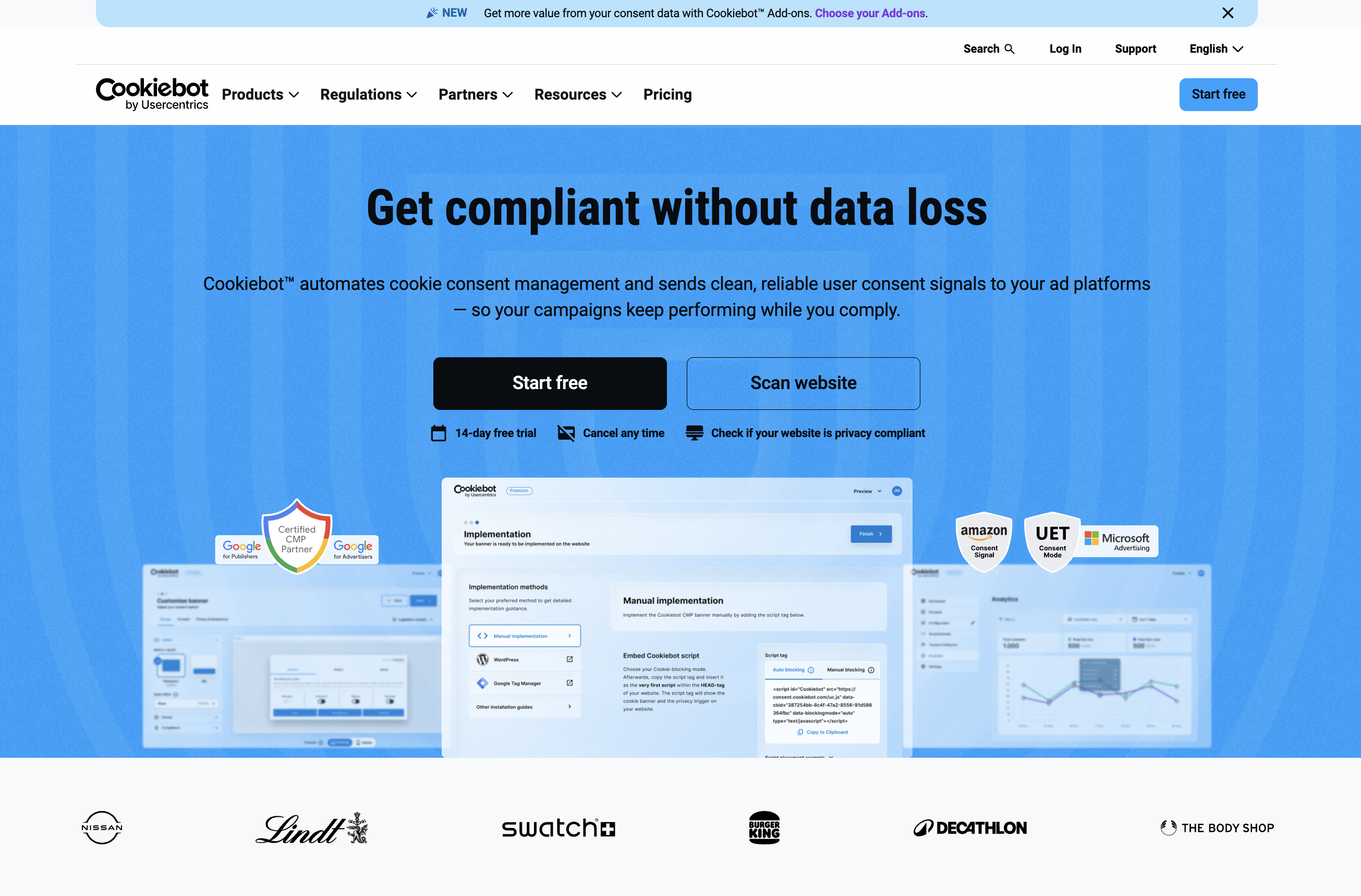
Cookiebot is a consent management platform from Usercentrics, which handles over 8.8 million user consents every month.
It belongs to Usercentrics’ suite of consent management platforms, which includes dedicated tools for each channel: App CMP, CTV CMP, and Web CMP.
Cookiebot CMP is built only for websites. It scans your site, sorts cookies into categories, and blocks trackers until visitors say yes.
It does part of the legal homework for you. Cookies get classified by category, your banner starts from a layout that follows the rules, and you control everything without touching code.
Plans bill per domain based on your page count. The free plan covers one site under 50 pages.
TL;DR: Cookiebot Review Ratings at a Glance
| Aspect | Rating |
|---|---|
| Customisation | ⭐⭐⭐⭐☆ Add your logo, style the banner, modify text and categories. |
| Control | ⭐⭐⭐⭐☆ Block scripts until consent, set banners by region, and run analytics for data-led decisions. |
| Ease of use | ⭐⭐⭐⭐⭐ No-code setup, easy to navigate interface with complete control in your hands. |
| Automation | ⭐⭐⭐⭐⭐ Scans your site, sorts cookies, manages trackers, and records responses. |
| Compliance | ⭐⭐⭐⭐☆ Law-based templates, Google Gold-tier certified, and consent signals for Google, Microsoft, and Amazon ads. |
| Pricing | ⭐⭐⭐⭐☆ A free plan that works, but tiers by pages and domains add up at scale. |
Cookiebot Features: Everything Cookiebot Offers
Banner and customisation
Cookiebot’s banner builder needs no code.
You start with a recommended template, such as GDPR-styled or CCPA-styled. You can adjust categories if needed, change the layout and text, and add your privacy policy link.
Premium adds your own branding, button styles, banners built in HTML, CSS, and JavaScript, and auto-translation into 47+ languages, while the free plan stays in one language.
Premium also adds geotargeting, which lets you set the banner each region sees.
Note: Cookiebot doesn’t limit your banner text. A button can read “Continue to Site” instead of “Accept All Cookies,” which misleads visitors. Keep your wording clear so your banner doesn’t break the rules.
Scanning and blocking
Cookiebot finds your trackers, then holds them back until visitors agree.
It scans your subpages and sorts cookies into necessary, preferences, statistics, and marketing. It flags the ones it can’t identify and publishes the full list as a cookie declaration for your privacy policy. Non-essential scripts stay blocked until a visitor consents. Premium blocks them automatically. On the free plan, you tag each script by hand.
Automatic scans also depend on your plan. The free plan runs the first scan only, Premium scans every month, and daily scans cost €99 a month extra.
Compliance and consent records
Cookiebot covers the privacy laws and ad signals most sites need, and keeps proof of consent.
On the legal side, Cookiebot lists support for GDPR, CCPA and CPRA, Brazil’s LGPD, and South Africa’s POPIA. It also publishes guidance for 11 US state laws, including Colorado, Connecticut, Texas, and Florida. State-level setups need Premium, and Cookiebot isn’t a legal guarantee. You still control cookie categories, banner text, and data retention.
Consent logs record who agreed to what, so you can show proof if anyone asks. Records stay for up to 12 months, and CSV export comes with Premium. Cookiebot has no tool for data subject access requests, so you handle deletion and access requests outside it.
If you run ads, this is the part that matters. Cookiebot is a Google Gold Tier certified CMP partner, and it sends consent signals to Google, Microsoft, and Amazon. Google Consent Mode v2, Microsoft UET and Clarity Consent Mode, and the Amazon Consent Signal switch on once the script is on your site.
Premium adds IAB TCF v2.4, which ad vendors need, and Cookiebot also honors Global Privacy Control.
Analytics
Cookiebot’s built-in analytics are basic, but the Beta add-on is worth a look.
Out of the box, Cookiebot records the number of opt-ins and opt-outs. You also get export-friendly consent logs and two free add-ons.
Audience survey lets you pick a page or a group of pages and ask visitors how they found you.
Consent benchmark lets you pick an industry and region, then shows the industry average, the best performer, and how your consent metrics compare.
Advanced analytics tracks how visitors interact with your consent banner, so you can make decisions from real data. But it’s limited to enterprise plans.
Privacy-First Website Analytics is still in Beta, and it goes further. It gives you:
- Traffic overview with sessions, pageviews, unique visitors, and high-level trends.
- Consent-aware insights show how declined consents affect your tracking visibility.
- Advanced analytics tools like funnels, session recordings, advanced statistics, and engagement metrics.
The best part? It collects all of this with a cookieless approach, so it doesn’t need consent.
How to Set Up Cookiebot: Step-by-Step
Sign up with your email address, then work through the steps below.
Step 1: Add your site
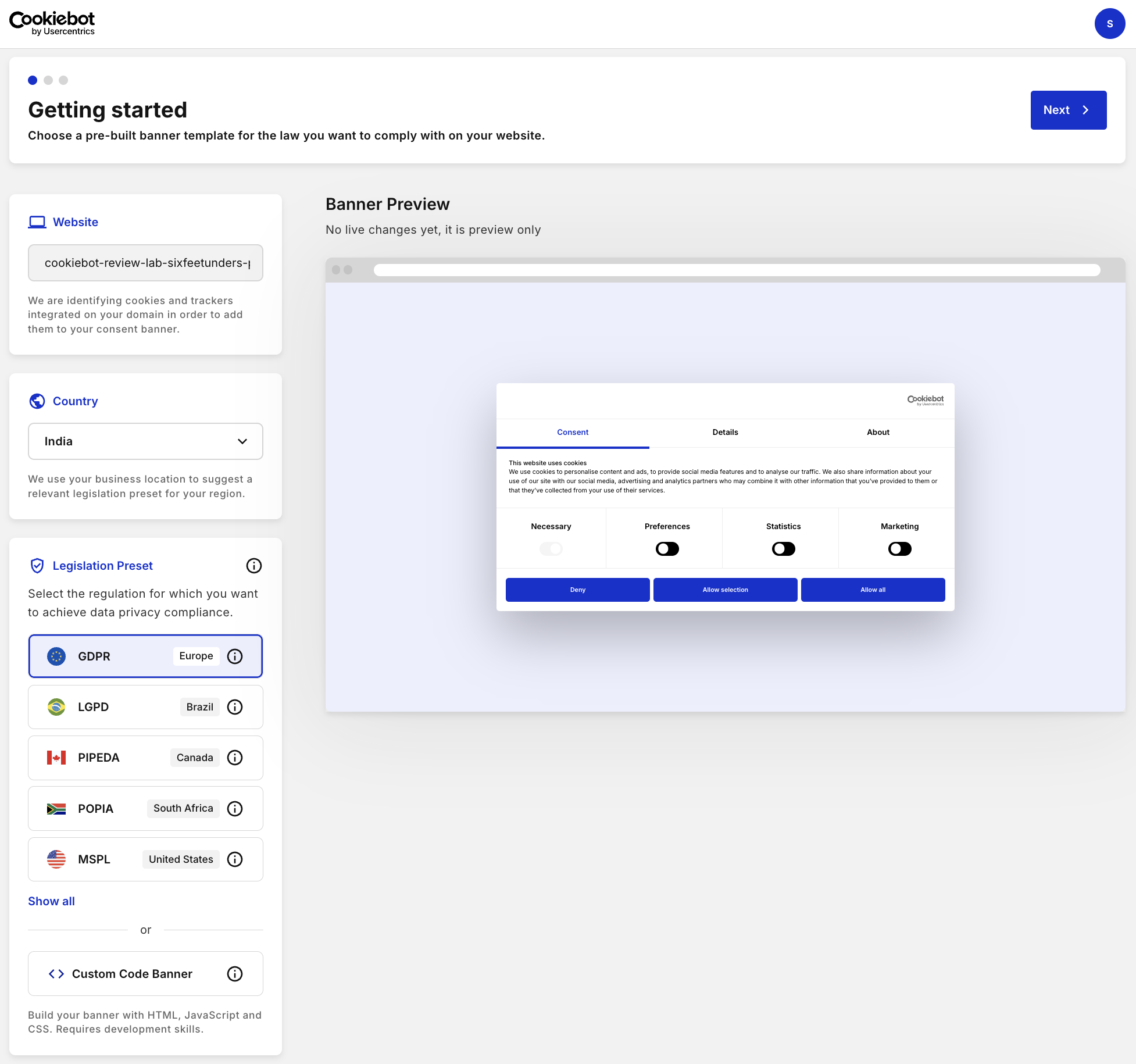
Enter your website and country, then pick a legislation preset for your target audience.
I found the preset the most helpful part of the setup.
You can also create a custom code banner.
Step 2: Configure your banner
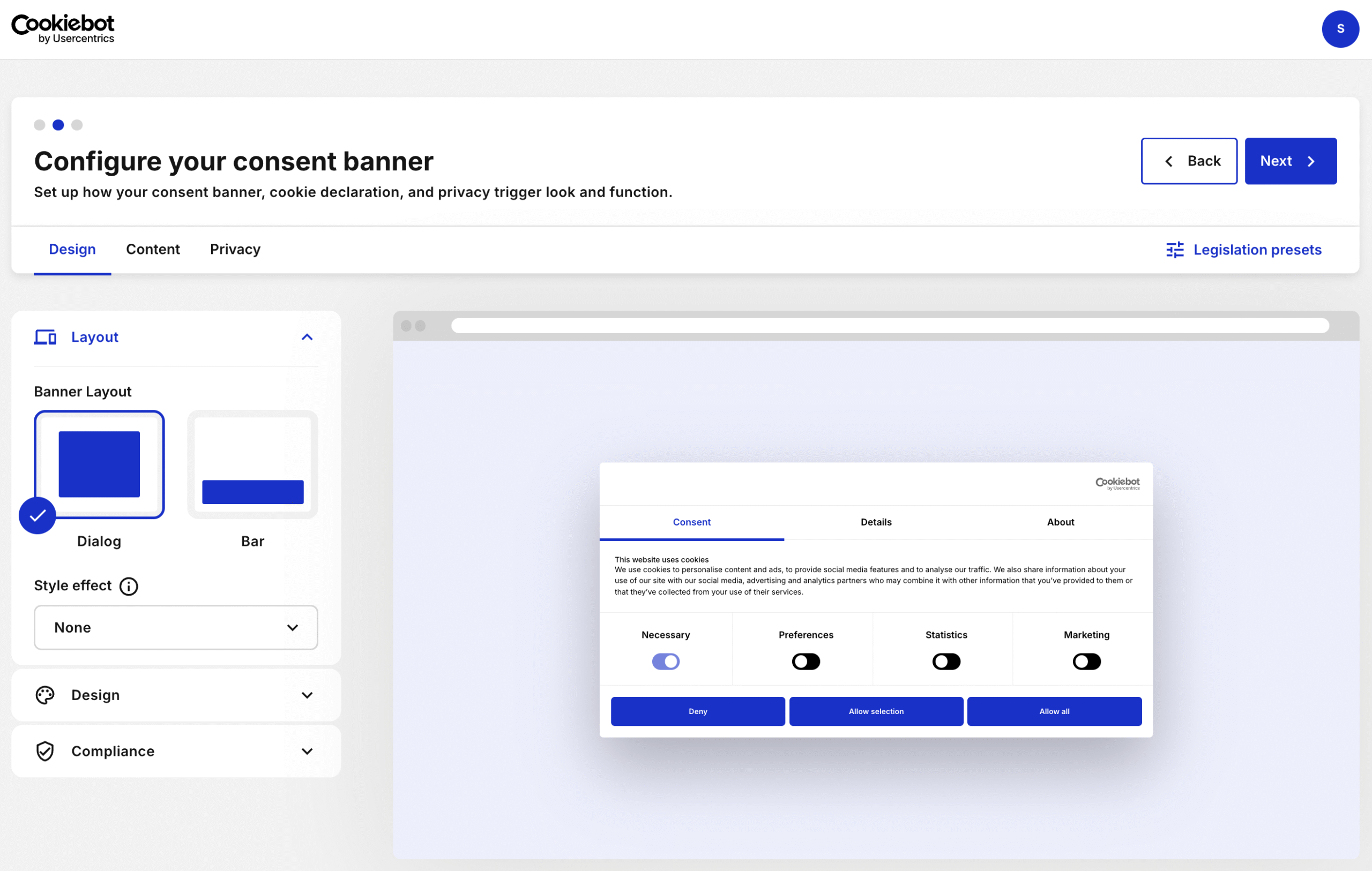
Choose a layout and style effect, then pick a theme and button style and add your logo.
The compliance settings come next.
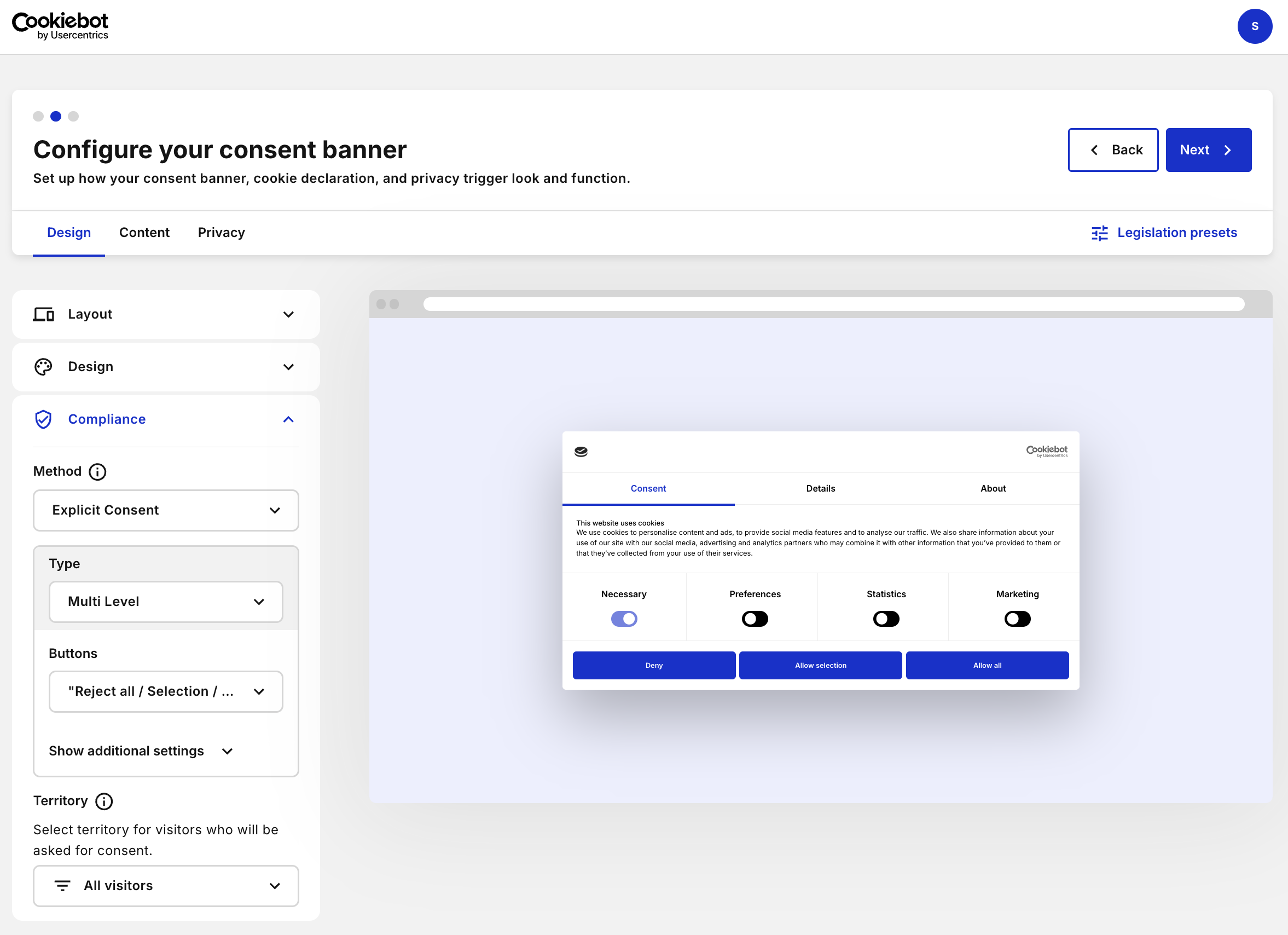
You start with a consent method.
- Explicit consent: Visitors must check a box or click “Accept” before any cookies are set.
- Implicit consent: Visitors agree by browsing or scrolling.
GDPR does not allow implicit consent for non-essential cookies. Visitors must take a clear, affirmative action.
Then you pick a consent level. It sets how much control visitors get over their data, so match it to where your users live.
- Multilevel: Visitors accept or reject specific categories like marketing, statistics, or preferences.
- Accept only / Reject only: Visitors get a binary choice, either accept all cookies or block everything non-essential.
- Custom / Information only: The banner tells visitors cookies are in use and gives them no way to block them.
Set your territory to one country if your audience is local, or to all if you serve visitors worldwide.
You can also set the checkbox modes and choose whether the banner shows a close icon.
Step 3: Implement the banner
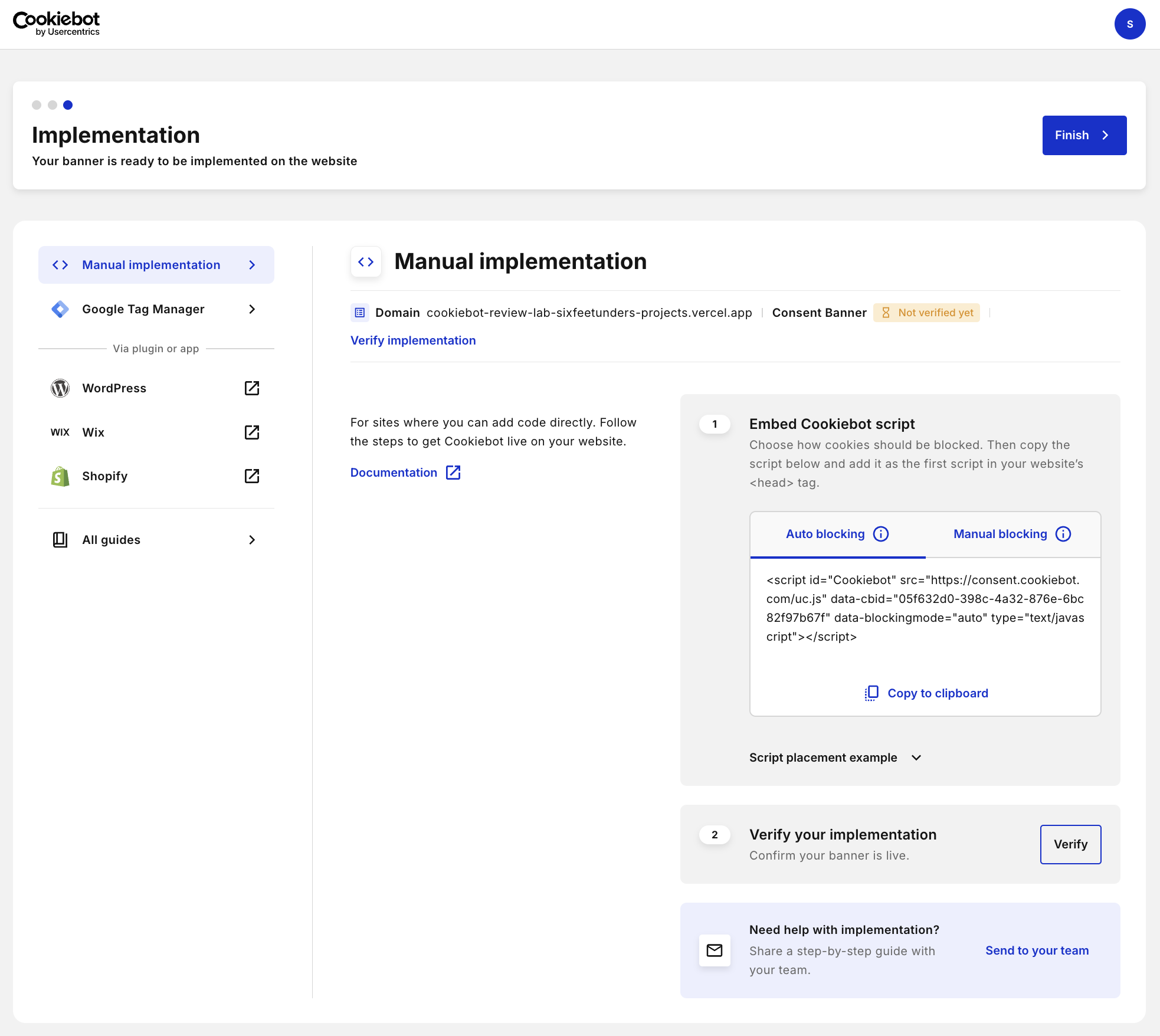
Pick how you want to install it and where. You can use custom code, Google Tag Manager, or a plugin for WordPress, Wix, or Shopify.
If you get stuck, Cookiebot has guides you can share with your team.
The Cookiebot Experience: Dashboard and Ease of Use
Cookiebot runs everything from one clean dashboard, and the left menu gets you to every tool fast.
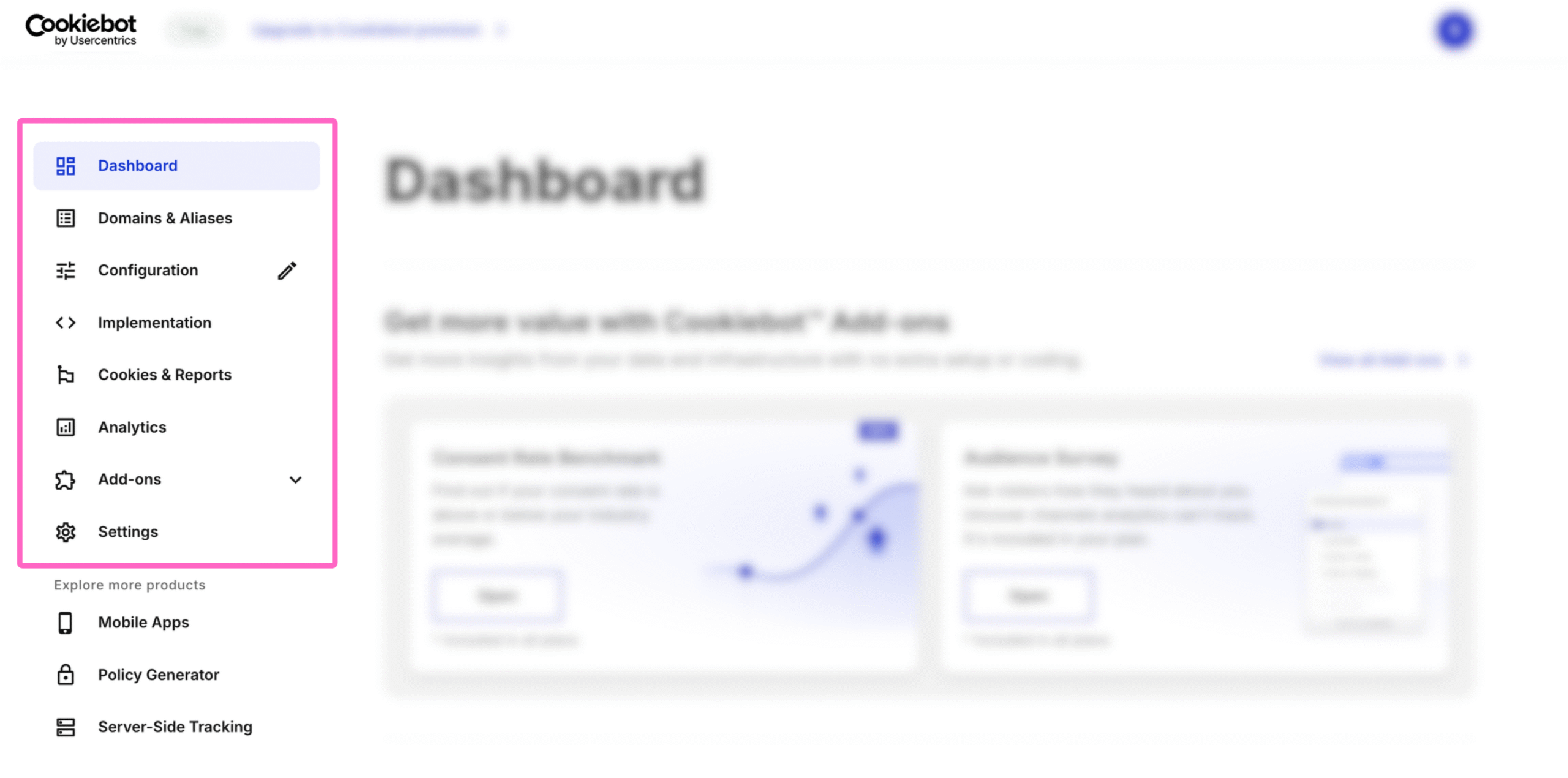
‘Domains & Aliases’ lists every domain connected to Cookiebot. Open one to check its details and data, change its settings, or run a scan.
‘Configuration’ lets you edit your banners and privacy triggers. ‘Implementation’ holds the snippets and instructions for connecting your banner to your domains.
The built-in analytics are basic, but you can pull the data out and run your own analysis. Open ‘Analytics’ and scroll to the bottom to find the consent log.
Cookiebot’s scanner crawls your site every month for cookies, scripts, and pixels, but it can miss a cookie that sits behind a login or a complex interaction. You might need to add that one yourself. Go to ‘Cookies and reports’, create a new tracker, and set its category, frequency, expiry, and description.
If you get stuck, the support guides cover most steps.
Cookiebot Pricing: Plans and Costs
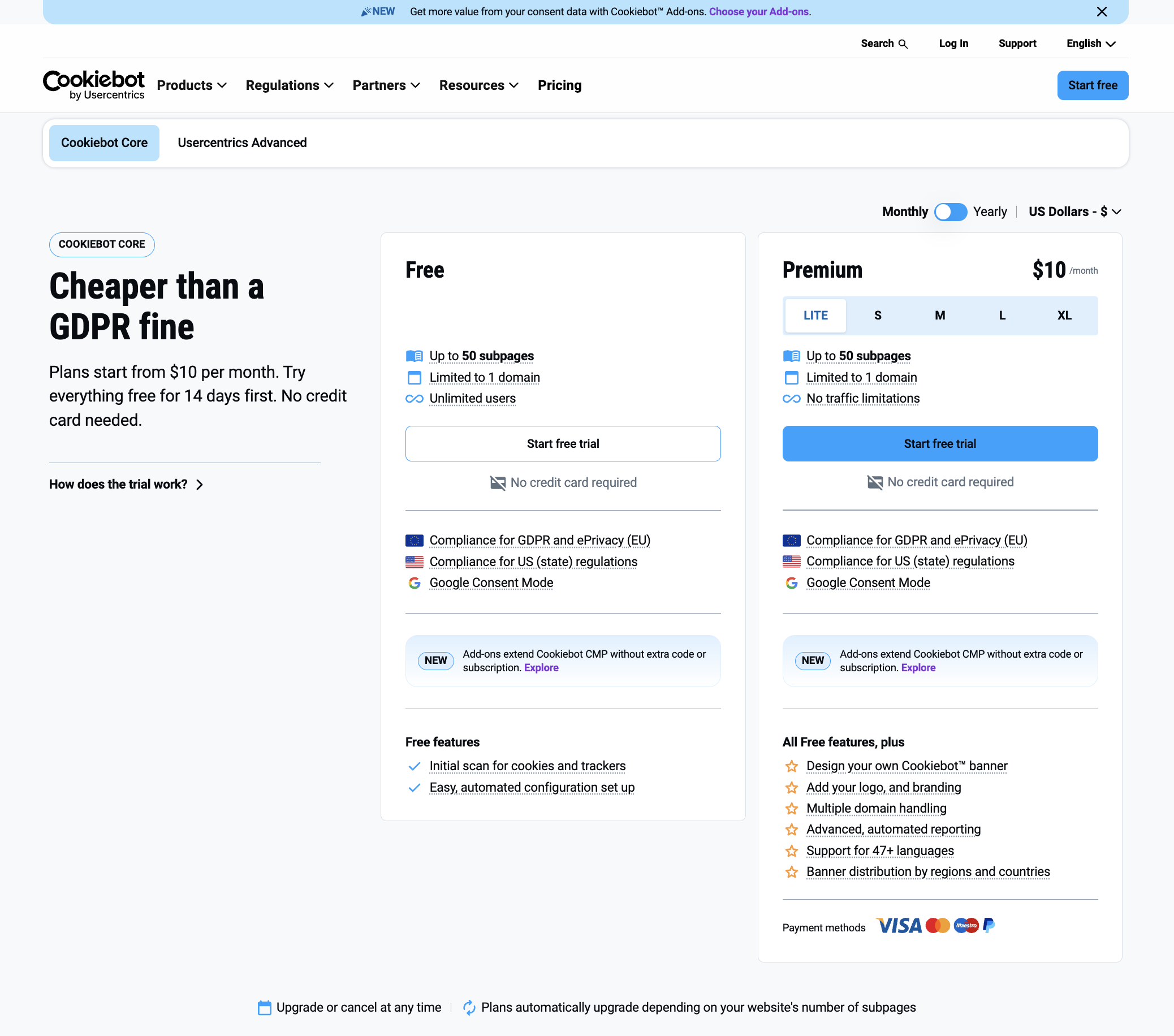
Free plan
The free plan is free forever and covers one domain under 50 pages. You get easy setup, tracking, one banner language, and manual script blocking. A visitor’s consent lasts one month, so returning visitors see the banner again. Add-ons work here too.
Premium
Premium runs from $10 to $120 per domain a month, and every plan starts with a 14-day free trial. You get your own branding, automatic blocking, multiple domains, 47+ languages, geotargeting, and more.
- Lite: $10 (1 domain, under 50 pages)
- S: $20 per domain a month (50 to 349 pages per domain)
- M: $43 per domain a month (350 to 3,499 pages per domain)
- L: $70 per domain a month (3,500 to 6,999 pages per domain)
- XL: $120 per domain a month (7,000 or more pages per domain)
Monthly and yearly plans cost the same per month, so yearly billing gives no discount.
Every subdomain counts as its own domain, and billing follows the highest page count Cookiebot has ever scanned. If the scan at the end of a billing cycle finds more pages than your plan allows, you move up a tier automatically.
The trial scan assigns your tier, so you see your real price before you pay.
Enterprise
Enterprise adds A/B testing, advanced analytics, and more. Book a demo to see it in action, and ask for a cost estimate.
Verdict: Is Cookiebot the Right CMP for Your Website?
Cookiebot is one of the most trusted consent platforms, but it isn’t the right fit for every business.
The no-code setup and all-in-one plans are appealing. But costs climb as your pages and domains grow, and some competitors get cheaper at scale. A few strong features like A/B Testing and advanced analytics also sit behind enterprise plans.
Here’s who should use it and who should skip it.
Use Cookiebot if:
- You manage one domain, or a few, with a small page count.
- You want a no-code way to get cookie compliance running.
- You run an agency with several small client sites and little technical help.
- You want a comprehensive plan with features most competitors charge extra for, plus add-ons that feel native.
Skip Cookiebot if:
- You own several domains with many pages, or one large site that adds pages fast.
- You run an e-commerce store that needs consent and audience tracking beyond the basics.
- You’re an enterprise with a team to build and run its own consent tool.


 A better way to manage projects and clients for freelancers
 Get through busy days like a breeze with Reclaim.ai