
Pipedrive and Attio have their own strengths.
They might offer similar features, but they approach sales workflows differently.
If you are on the fence about which one to buy, this guide will help you choose the CRM that works best for your business.
You’ll find a quick comparison chart, then a breakdown of their core functions and pricing.
Let’s start with the basics.
Pipedrive Vs. Attio At A Glance
| Categories | Pipedrive | Attio |
|---|---|---|
| Sales Pipeline | Ready-made visual pipelines with drag-and-drop functions. | A multi-purpose visual Kanban board for sales and project management. |
| Data Model | Pre-defined categories to organize leads, people, organizations, and deals. | Predefined categories with the option to create your own data objects. |
| Customization | Customize existing fields, pipelines, and dashboards. | Customize fields, pipelines, views, filters, and workflows. |
| Communication Channels | Multiple email providers, messengers, calendar, meeting tools, web calls, chatbot, collaboration. | Gmail and Outlook, calendar, messenger, meeting tools, web calls, and collaboration. |
| Automation | Automates sales tasks, lead assignments, follow-up emails, and deal updates. | Builds workflows that automatically update records, send notifications, and handle tasks. |
| AI Capabilities | Analyzes deals, generates emails, creates meeting briefs, and answers questions. | Researches companies, drafts emails, analyzes deals and calls, builds workflows, and answers questions. |
| Reporting | Sales reports, revenue forecasts, and dashboards to track team performance. | Custom reports to track sales pipelines, revenues, and team performance. |
| Integrations | 500+ third-party integrations plus developer tools. | Over 300 third-party integrations plus developer tools. |
| Best For | Small and growing businesses that want a hassle-free sales tracking system. | Startups and growing businesses that want to build custom workflows. |
What Is Pipedrive
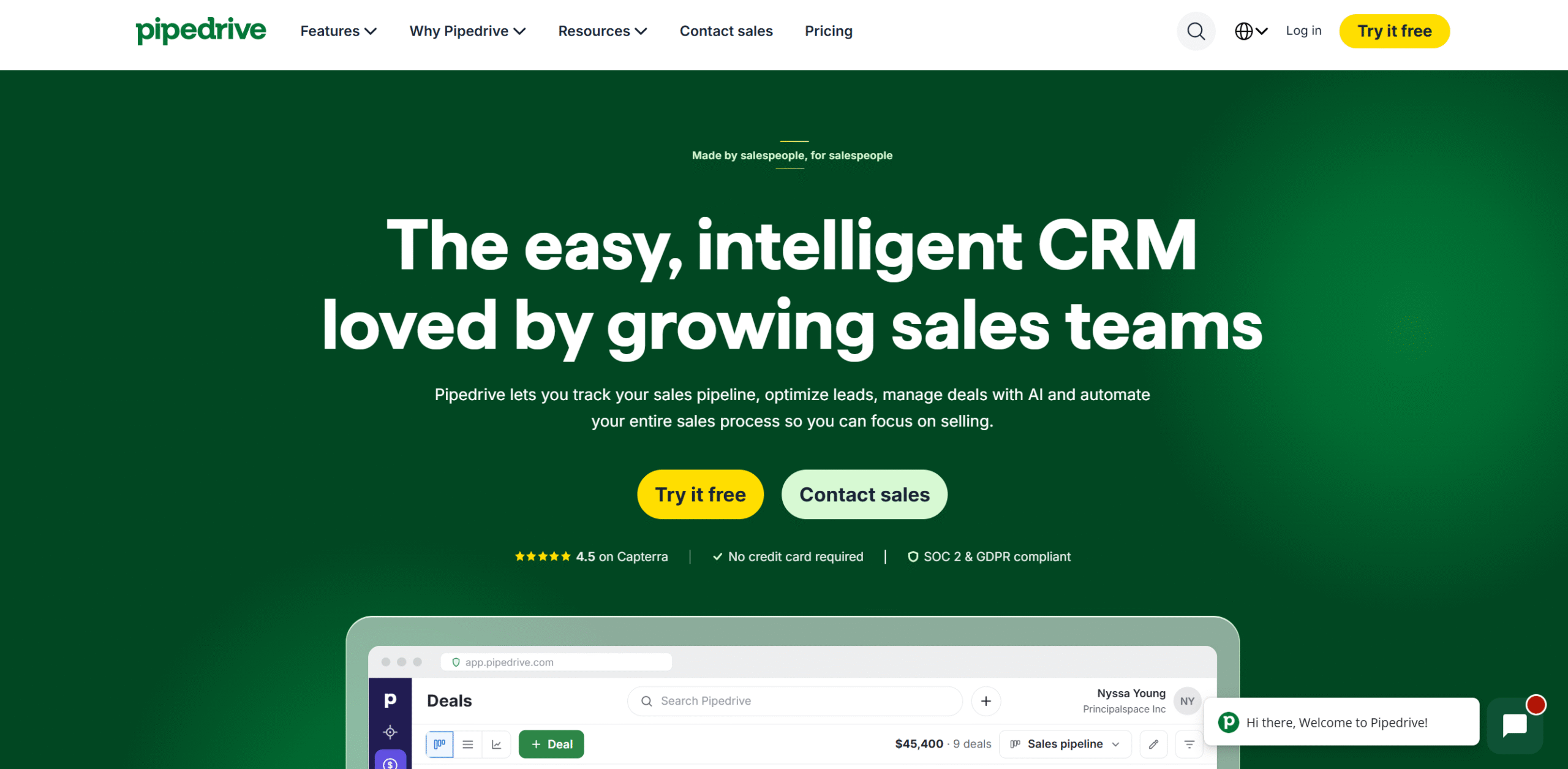
Pipedrive is a purely sales CRM.
It offers ready-made pipelines and contact management tools to make the sales process more visible.
You can maintain up to 300,000 active leads and deals on a single account and give your team access to the same workspace. You can customize your pipeline and automate your outreach campaigns.
Pipedrive has also recently upgraded its system and has introduced advanced AI features. You can now connect it to ChatGPT and Claude and access Pipedrive data through ChatGPT.
Pipedrive has its own built-in AI too, to help automate admin tasks and analyze sales conversations. I have reviewed it separately to show what it can do.
Core Features
- Visual sales pipelines to show where each deal stands.
- A database to organize leads and contacts.
- A centralized inbox for email and chat conversations.
- Workflow automation to handle tasks, deals, and follow-ups.
- Real-time dashboard to track revenues and team performance.
- Custom fields to track specific data.
- AI sales assistant to predict wins and record conversations.
- Integration with third-party applications.
- Mobile apps and Chrome extensions.
Pipedrive has a few more features, such as a live chat widget and website forms, but these are its core functions.
What Is Attio
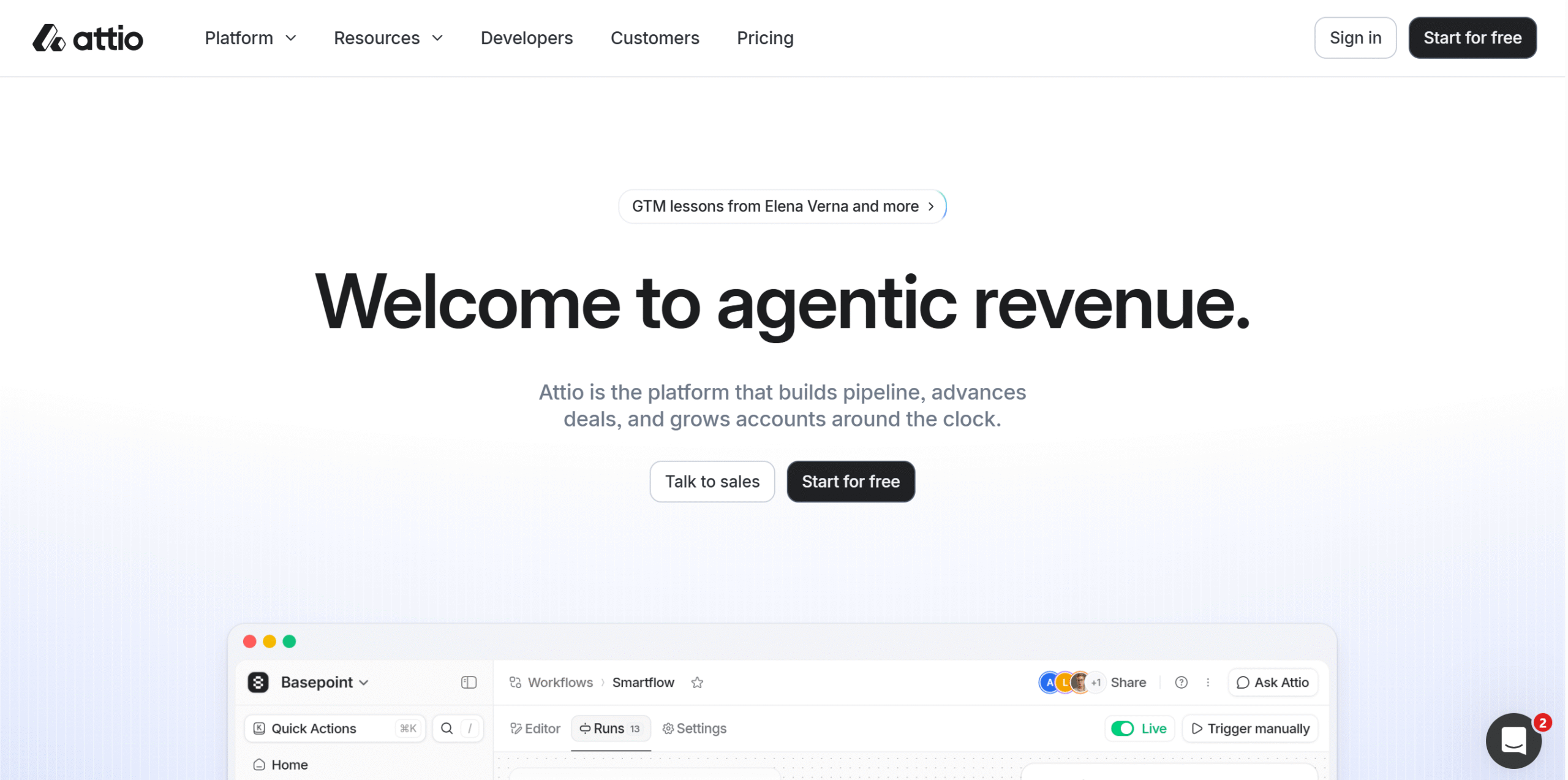
Attio, like Pipedrive, is a CRM, but it’s more flexible in how you manage contacts, pipelines, and workflows.
Instead of just providing ready-made templates, Attio lets you create a custom database and set it on autopilot. In other words, you can add your own categories for the data your business needs.
All the traditional CRM functions are available on Attio. You can build pipelines, organize leads, monitor sales activities, and automate follow-ups.
The software simply lets you organize data your way and offers built-in AI to make everyday work easier.
Core Features
- Visual sales pipelines for tracking current deals.
- A custom database to organize leads and contacts.
- Auto-enrich company profiles with AI.
- Built-in AI to record, transcribe, and analyze meetings.
- Email and calendar integration.
- Workflow automation to handle tasks, deals, and follow-ups.
- Real-time dashboard to track revenues and team performance.
- Integration with third-party applications.
- Mobile apps and Chrome extensions.
You can also connect Attio with an AI assistant like ChatGPT and Claude.
Pipedrive Vs. Attio: Feature Comparison
Let’s look at Pipedrive and Attio’s core features to see how they compare.
I have reviewed their pipeline management, customization, communication, and automation functions.
I will start with their sales pipelines.
1. Sales Pipeline and Deal Management
A sales pipeline is a visual board that shows each stage of the sales process from leads to deals.
It acts as a roadmap to track deals as they progress through different stages.
Both Pipedrive and Attio are good at managing sales pipelines and deals. They just handle them in their own way.
Here’s the summary.
Pipedrive
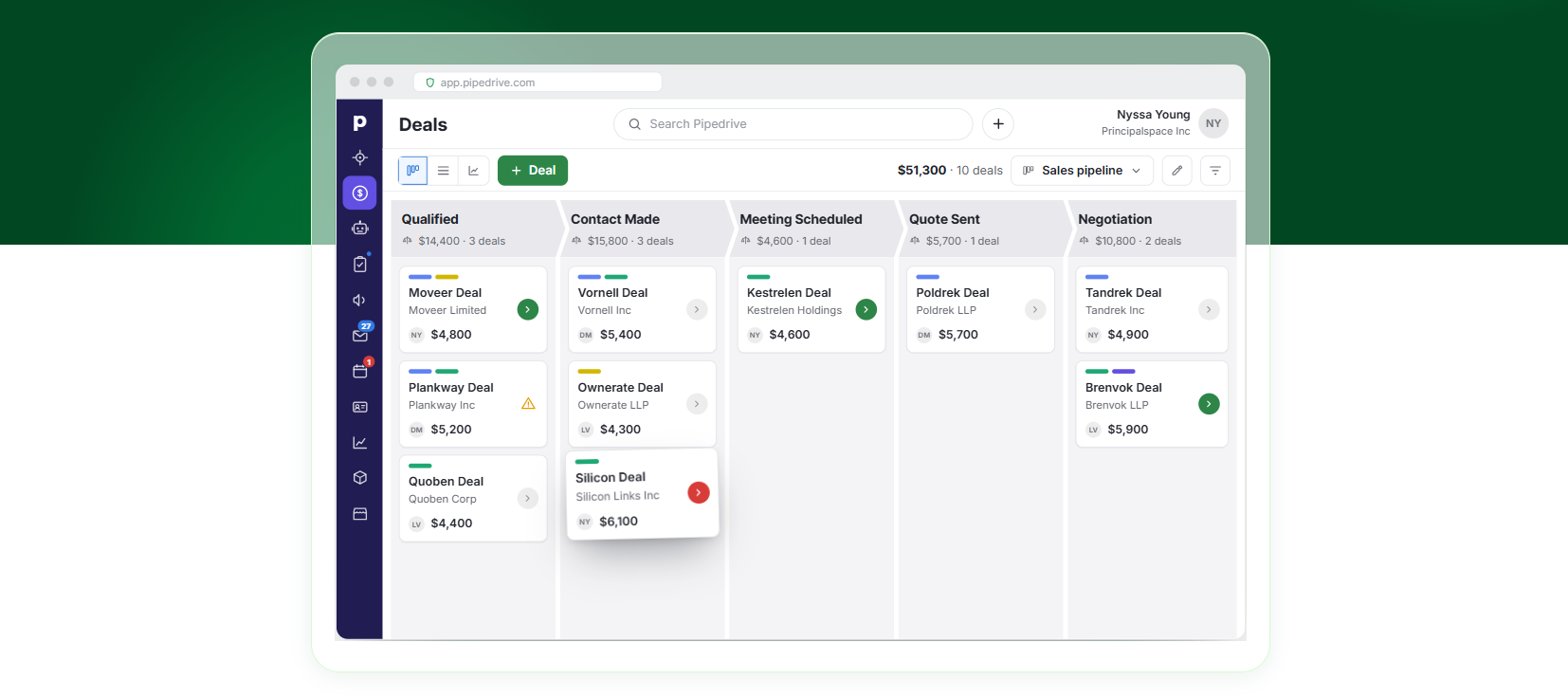
Pipeline management is Pipedrive’s main function.
While it’s a traditional CRM, most of its features revolve around the sales pipeline, making it the center of your operations.
The pipeline is visual and intuitive, with everything visible on the main board. You can create deal cards, add information, and assign them to team members.
A separate inbox is available to park potential leads. Once the lead is qualified, you can convert it into a deal and add it to the sales pipeline.
You can set up several types of alerts to monitor your pipeline. For example, if the deal sits for too long or someone hits their goal, Pipedrive sends you a notification.
Pipedrive also offers an add-on project board that shows post-sale activities, like onboarding. You can, of course, use a separate project management tool, but this feature keeps everything in one place.
Deal probability is another feature worth mentioning.
You can assign a winning percentage to a deal or a stage, and Pipedrive automatically updates your sales estimates as you move the card through the stages.
This tells you how much revenue you can expect from each deal if it goes through.
Attio
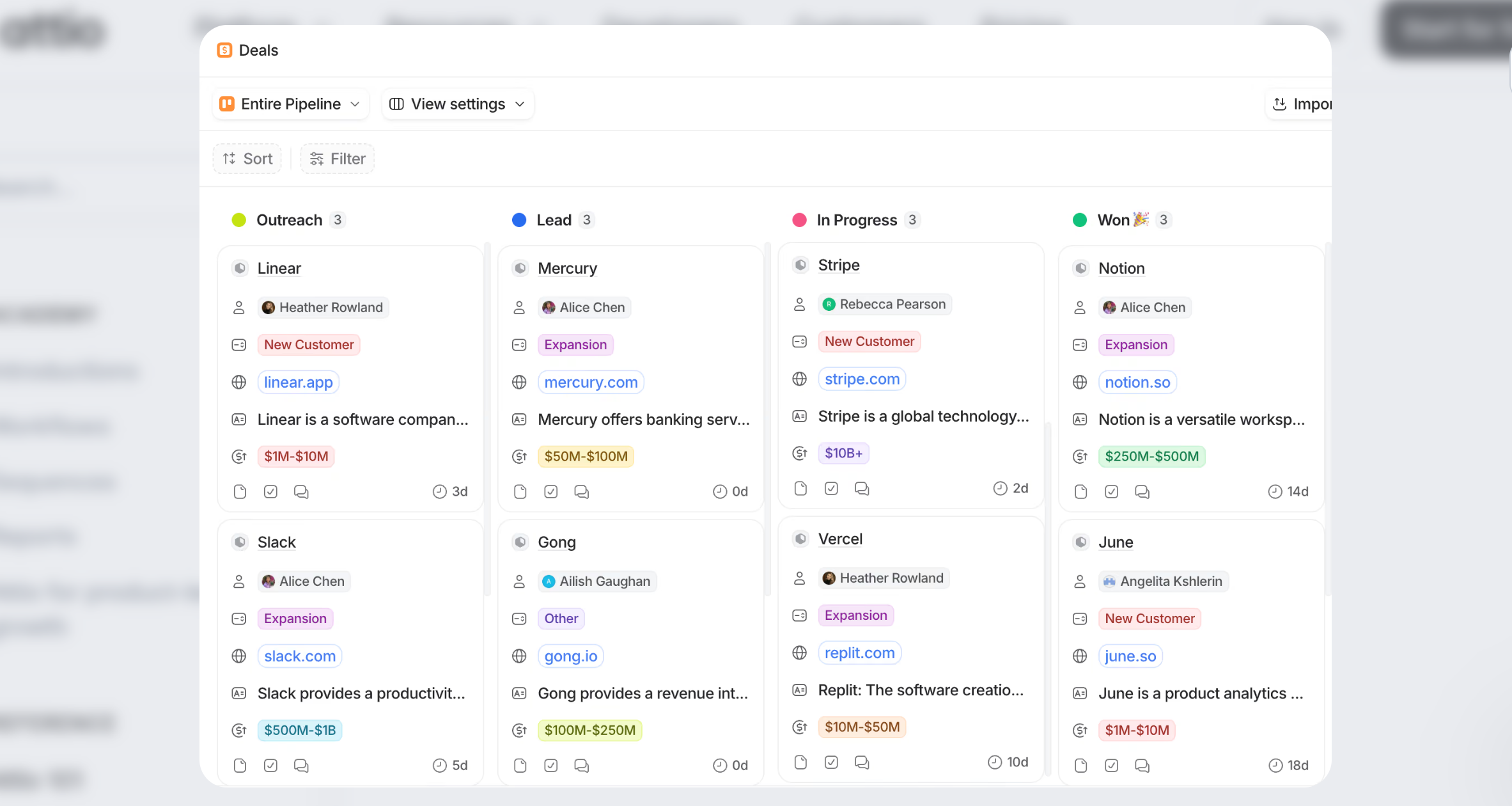
Attio’s function is similar. It provides a Kanban board where you can create deal cards, move them around, and monitor them through different views.
You can include details inside each card and assign it to a team member.
You don’t have to write details manually. You can just link it to the company profile and see the information. (This feature is also available in Pipedrive, by the way.)
You can track a deal’s status both manually and automatically.
You can set up a timer for each pipeline stage. Once it expires, the counter turns red, letting you know the deal is stuck. It’s similar to Pipedrive’s idle deal tracking (deal rotting).
What makes Attio different from Pipedrive is its flexible setup. The Kanban board isn’t just for deal management. You can use it for people, projects, and workflows.
You don’t have to buy an add-on for project management, either. Attio lets you create, assign, and collaborate on tasks.
You can also calculate the expected revenue of each deal, although Pipedrive’s probability feature makes the process more straightforward.
Verdict
If you look at Pipedrive and Attio from a sales pipeline’s angle, both are excellent platforms. They let you track opportunities, estimate potential revenues, spot idle deals, and gain visibility.
The difference is in the structure.
Pipedrive is designed specifically for sales pipelines. You basically get a hassle-free system to manage sales processes.
Attio, on the other hand, allows you to build a pipeline for any workflow, not just sales. It just requires a bit of work.
2. Data Model And Customization
Every CRM uses a structure to store information. We call them data models.
Some CRMs offer predefined data models set as default fields, and some let you tailor how you store information.
Pipedrive and Attio offer both. You get predefined layouts, but you can customize them to meet your business requirements.
Here’s a summary of their customization capabilities.
Pipedrive
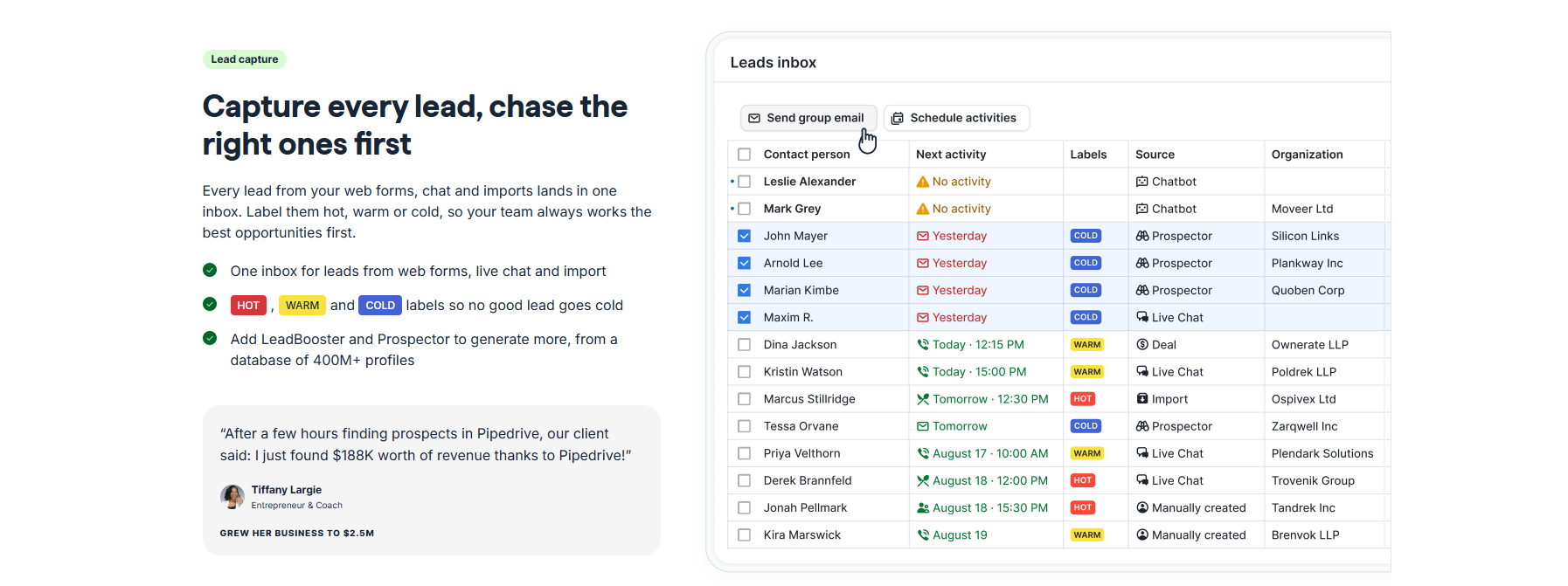
Pipedrive is incredibly easy to customize. Most of its customization options are pretty straightforward, and you can make changes without technical knowledge.
Some of the things you can tailor include pipeline stages, cards, fields, and reports.
You can add or remove stages and rename them, hide unnecessary features from the display, decide what to show on cards, and tailor your reporting dashboard.
Not only that, but you can also add extra boxes to deals and contact forms to store custom data.
One other thing. If you have purchased its chatbot widget for your website, you can change its color to match your brand tone. You can do the same with your outreach emails.
Third-party integration is available too, including an open API. Pipedrive groups its integration options by revenue cycle, making it easier to find what you need.
Attio
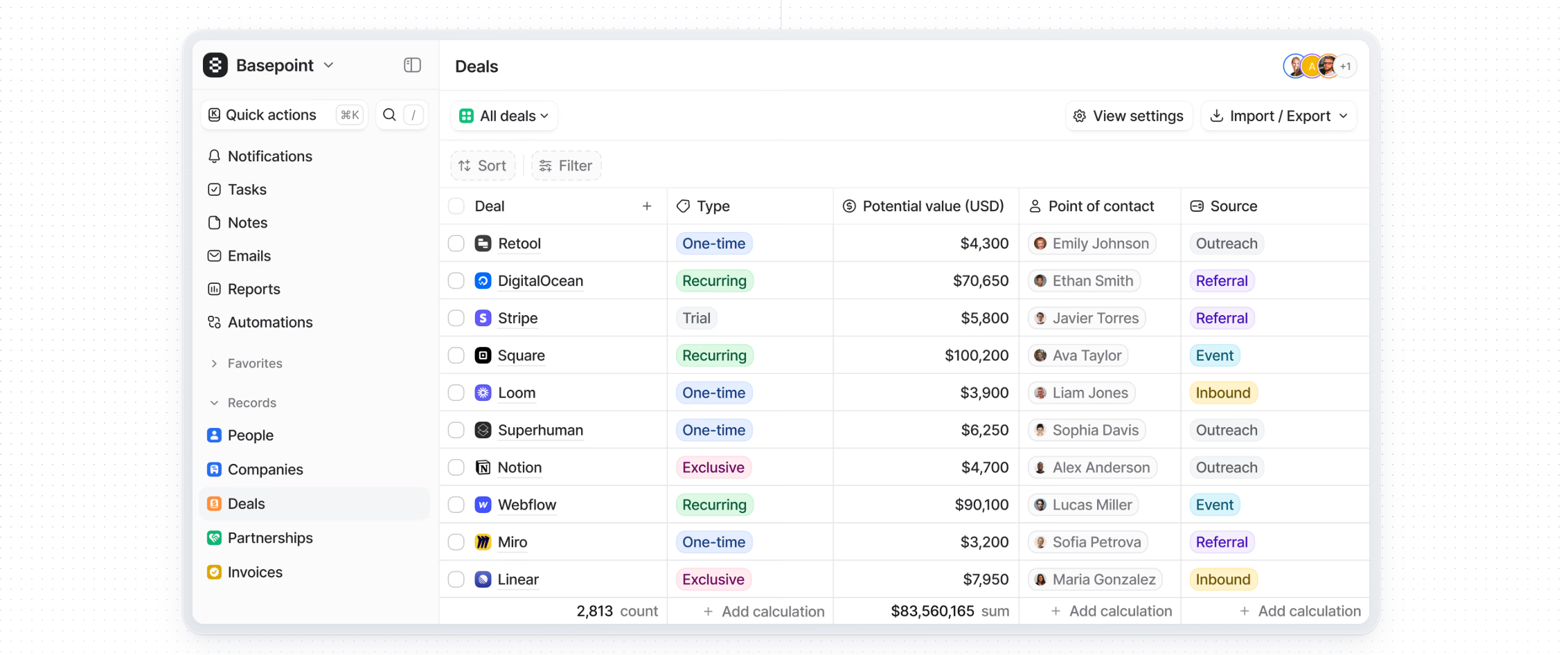
Attio’s core selling point is its customization. You can customize almost every part of your CRM.
For example, if you sell a digital product, you can create a custom object (or categories) like subscription and add custom attributes like monthly payments, renewals, and cancellations.
And that’s just one area. You can customize other aspects of the CRM, including the pipeline display.
You can filter fields to display the information you want to see, so your workspace doesn’t feel cluttered.
You can also decide which details to show on the contact records and what to highlight.
Integration is another way you can customize your workflows. You can connect Attio with Zapier or use its developer platform. It’s up to you.
Verdict
Pipedrive and Attio both allow you to tailor your processes. The difference lies in the level of customization they offer.
Attio is built with flexibility in mind, providing tons of custom options.
Pipedrive is more straightforward. It offers just enough customization to meet most sales teams’ needs.
3. Communication and Collaboration
We’ve explored how Pipedrive and Attio handle sales pipelines and customer data.
Now let’s look at how they support the sales team in day-to-day activities and communication.
Pipedrive
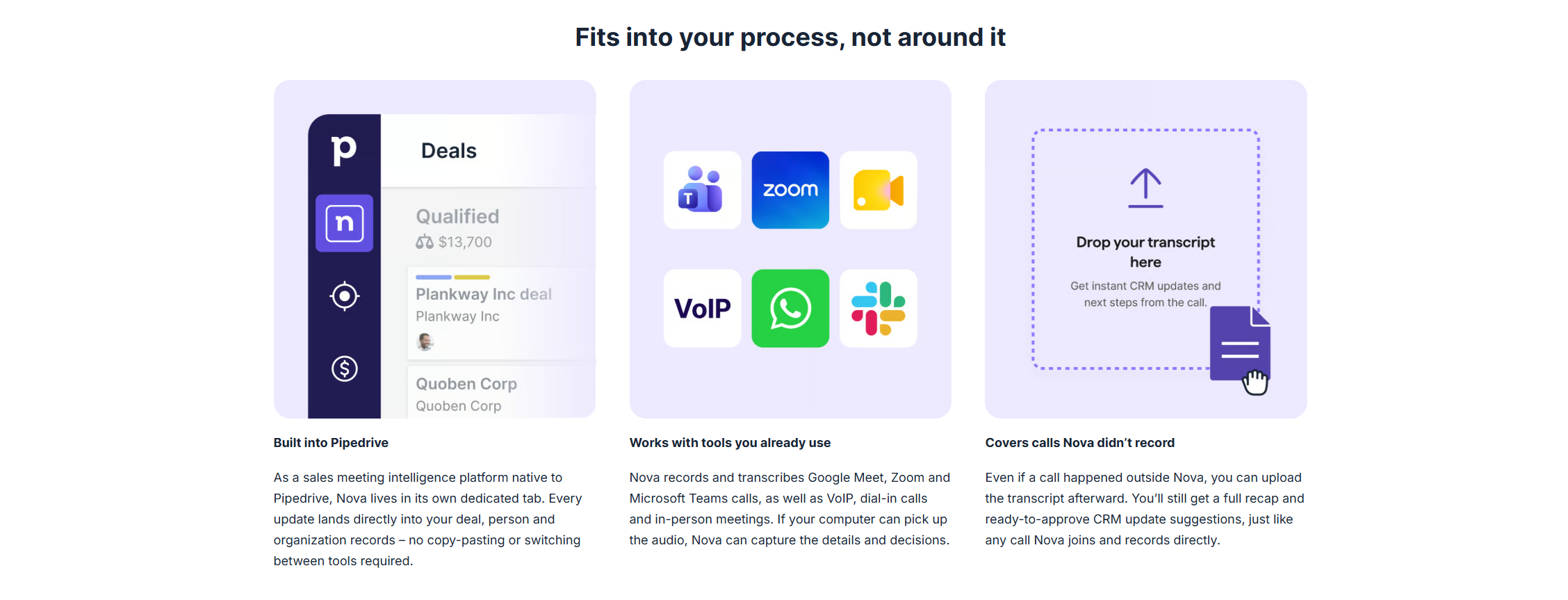
Pipedrive gives you several ways to communicate with your internal team and clients.
You can connect Gmail for inbound and outbound emails, use Zoom or Microsoft Teams for client calls, and integrate WhatsApp or Slack for updates.
A web calling option is also available. You can connect a telephony app to take calls from your desktop.
For the internal team, Pipedrive provides a universal inbox with collaboration tools. They can access the shared inbox to see incoming emails and tag members to leave notes.
Email marketing is actually Pipedrive’s main communication channel.
You can do a lot of things with this option, like creating email follow-up sequences, sending mass emails, and checking whether they have opened your email.
Activities are tied to deals, so all the historical details are stored under deals, whether it’s an email, call, or text.
If you want to schedule activities, you can sync your business calendar too. Any event you add to the calendar will be automatically updated on both sides.
Attio
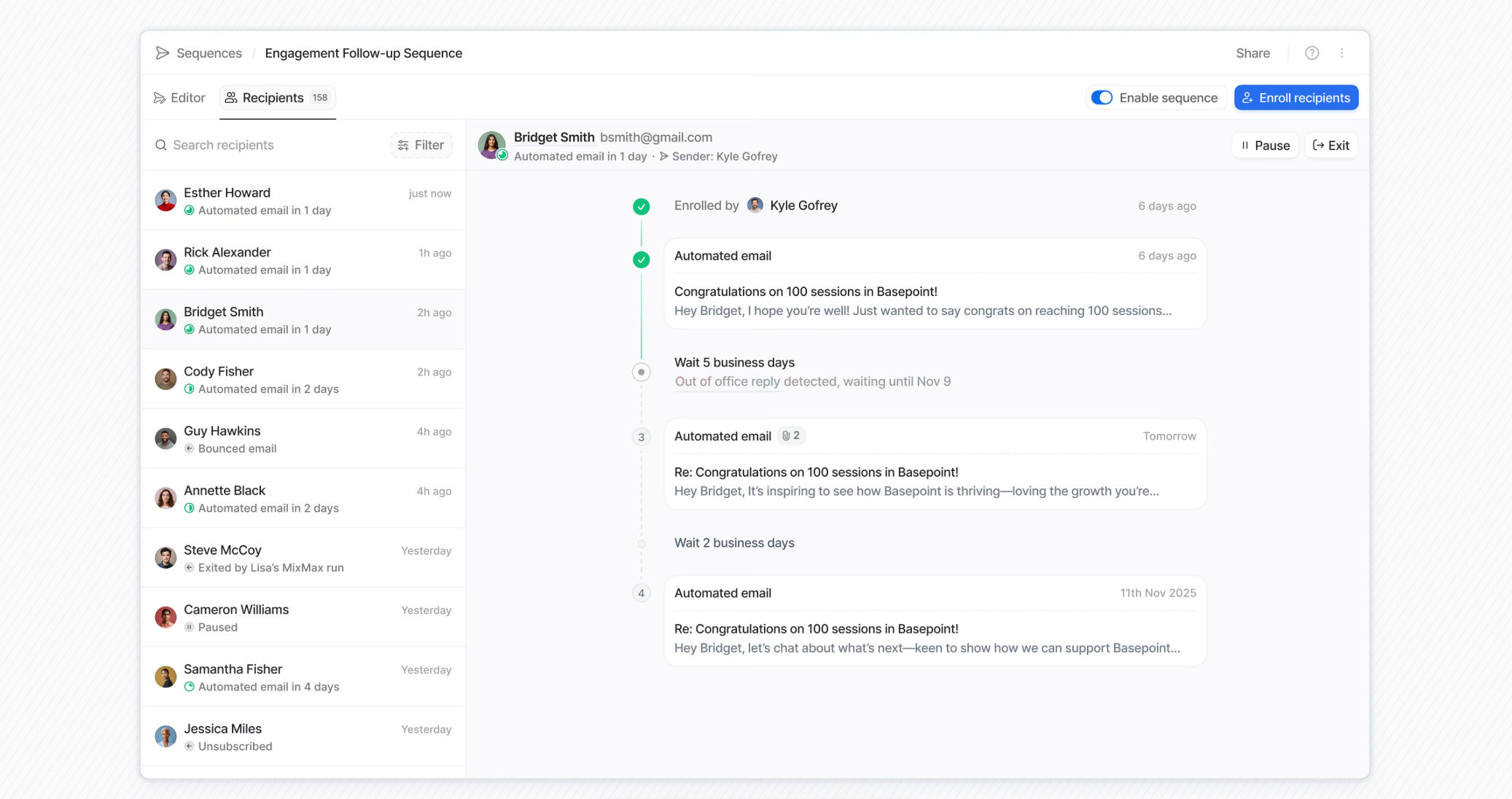
Attio, like Pipedrive, focuses mainly on the email channel for correspondence.
You can connect your Gmail or Outlook, handle emails directly from Attio, create automatic follow-ups, and send emails in bulk.
Through shared calendars, you can schedule meetings and events.
The emails are directly linked to the company profiles, and no one can see the history unless you allow it.
Your team members can, however, leave notes and comments on the records and start discussion threads without needing permission.
Slack integration is also available for the internal team. You and your team members can ask Attio to retrieve information from the CRM directly from your DM.
Apart from emails and messages, Attio supports calls, WhatsApp, Zoom, and web phones.
Verdict
From a purely communication perspective, both Pipedrive and Attio are on the same level.
They support all the major communication channels and provide a shared workspace for collaboration.
But Pipedrive is excellent for sales outreach, while Attio offers better team collaboration features.
4. AI and Automation
One of Pipedrive and Attio’s core functionalities is their built-in AI and automation. They speed up routine jobs, helping the sales team with emails, calls, tasks, and monitoring.
Here’s a summary of their AI and automation capabilities.
Pipedrive
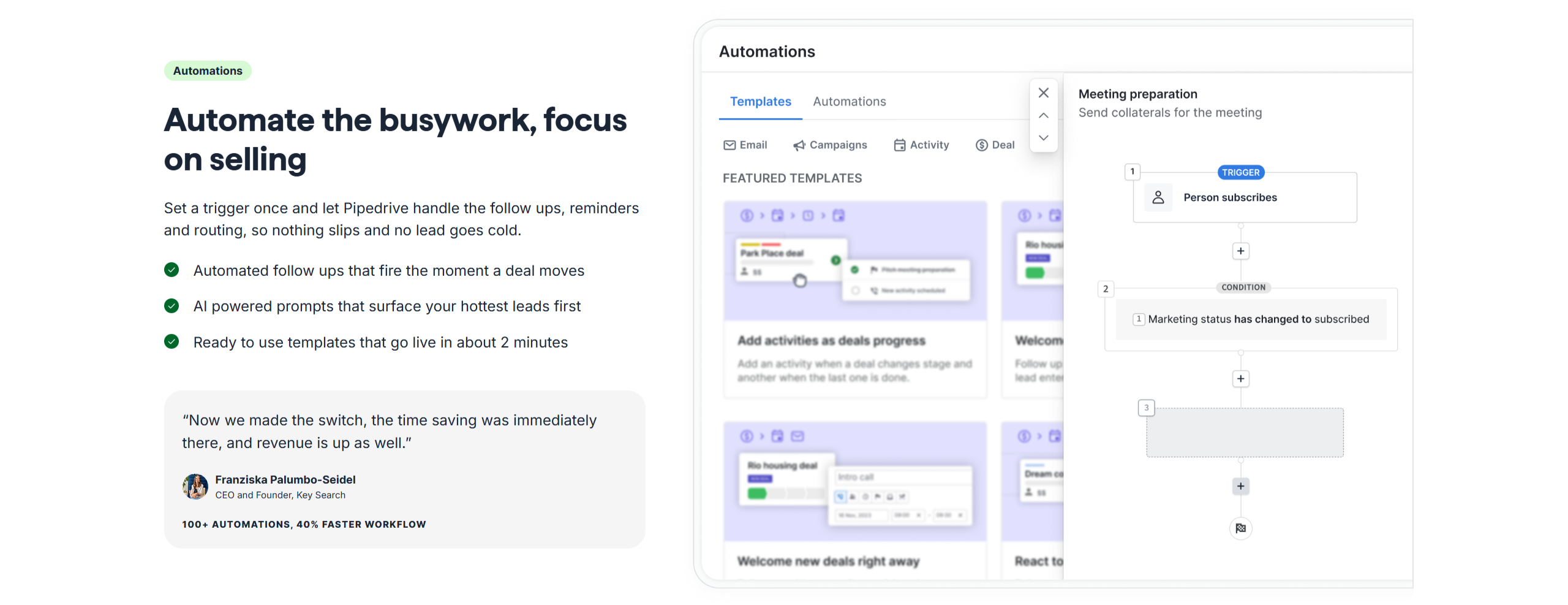
Pipedrive allows you to build if/then workflows to automate routine tasks, such as data organization and task management.
For example, you can create a workflow that instructs Pipedrive to collect lead data from web forms, add them to the CRM, and assign them to a team member.
You can also create a multi-step email sequence for outreach campaigns and set it on autopilot.
There are other features as well.
If your data is scattered, you can find the missing details through Pipedrive and complete the records.
Pipedrive’s AI works like a sales assistant, helping you find information, draft emails, and summarize lengthy conversations. Plus, it can pull data from deals and create briefs for the meeting.
The AI can also handle advanced tasks such as taking data from your spreadsheet and putting it in the right fields.
Attio
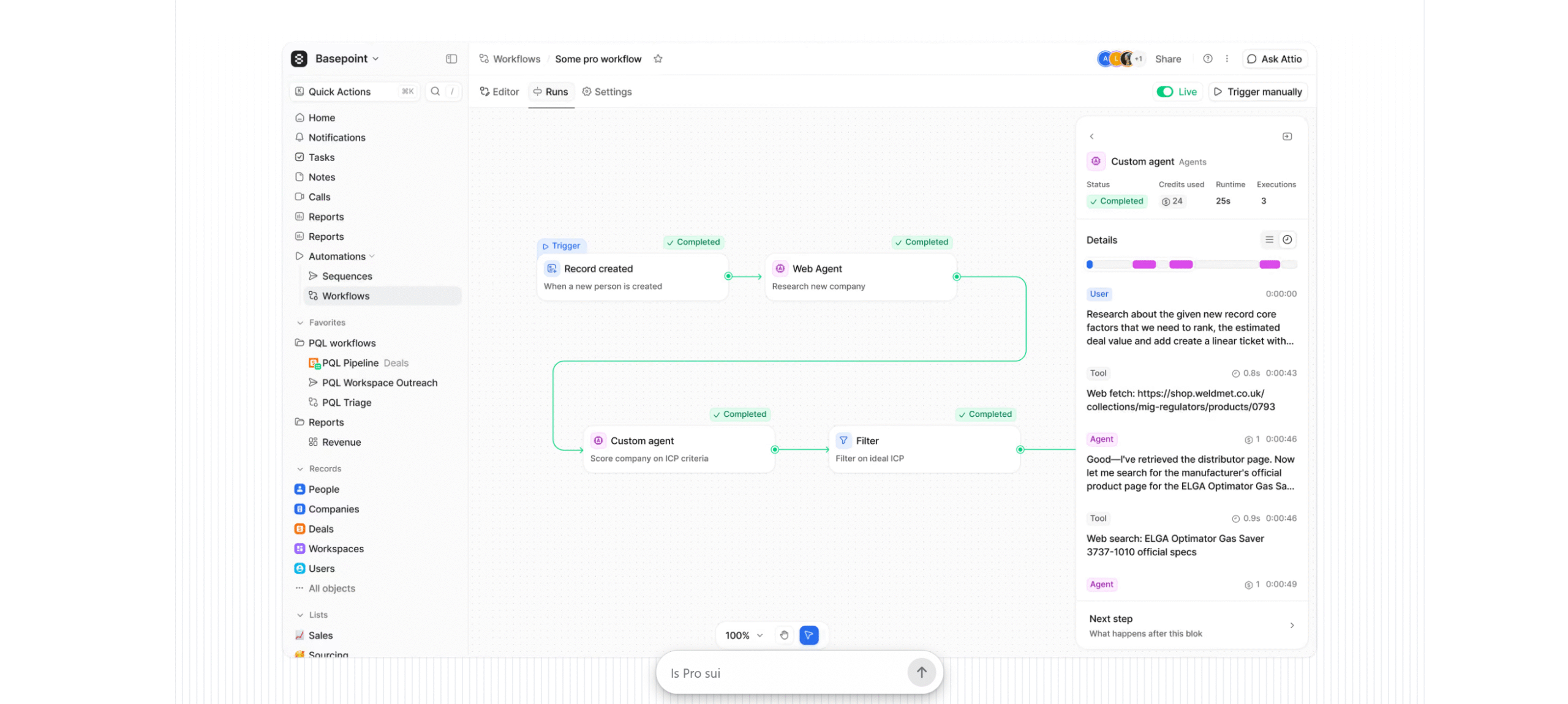
Attio’s AI is more integrated than Pipedrive’s.
Instead of creating visual automation steps, you can just tell Attio what you want, and it can build an automation workflow.
It can also automatically create profiles of people you have talked to and find more information on the web. If you are on a call, it can generate notes and follow-up tasks.
There are lots of other things Attio can do. It can update records, prioritize deals, and spot bottlenecks.
Verdict
Attio’s AI and automation are better comparatively.
Pipedrive can no doubt do most of the stuff Attio does, but Attio is smarter.
Pipedrive’s automation is more conventional. It focuses on specific workflows, like tracking deals and automating the follow-ups.
You can connect ChatGPT, but it’s not a built-in feature like Attio’s.
5. Pricing
Pipedrive and Attio charge monthly subscriptions. They offer scalable packages, so you can upgrade your system as your business grows.
You can try them for free and get discounts on annual packages. Pipedrive provides up to a 26% discount on annual plans, and Attio offers around a 20% discount.
You can change or cancel your plans anytime, but neither Pipedrive nor Attio refunds the amount on cancellation. So please keep that in mind.
Here’s the summary of Pipedrive and Attio’s pricing.
Pipedrive
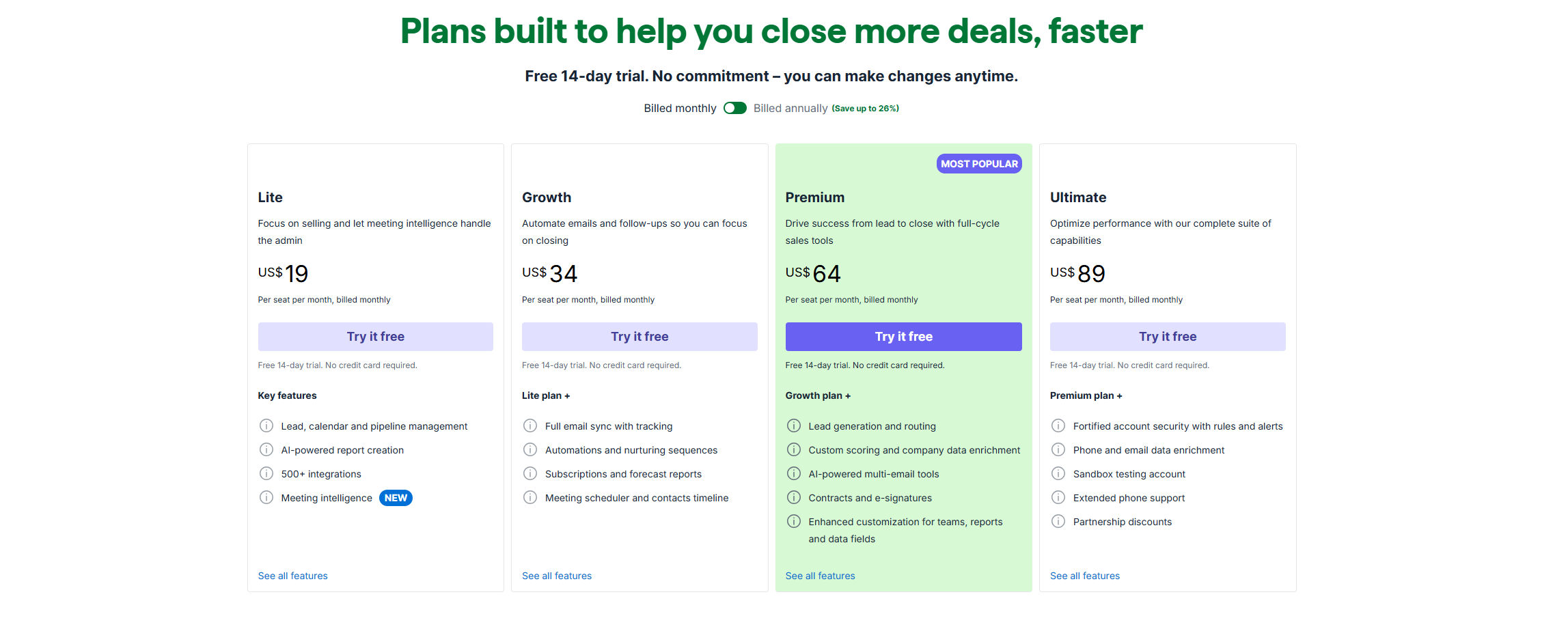
Pipedrive charges a flat per-seat monthly fee. Each plan has a limit on the number of active deals and leads you can manage per seat. The maximum limit is 300k.
- Lite Plan: It costs $19 per month and $14 if you buy the annual package. You’ll get 2500 active leads and deals per seat. You can add more seats.
- Growth Plan: It costs $34 per month. The package provides 3000 leads and deals per seat and access to advanced if/then automation.
- Premium Plan: It costs $64 per month and unlocks team collaboration tools, like a universal inbox and project management.
- Ultimate Plan: It costs $89 per month and gives you access to everything, plus partnership discounts.
You can take a free trial to explore the premium plans and buy more seats.
Attio
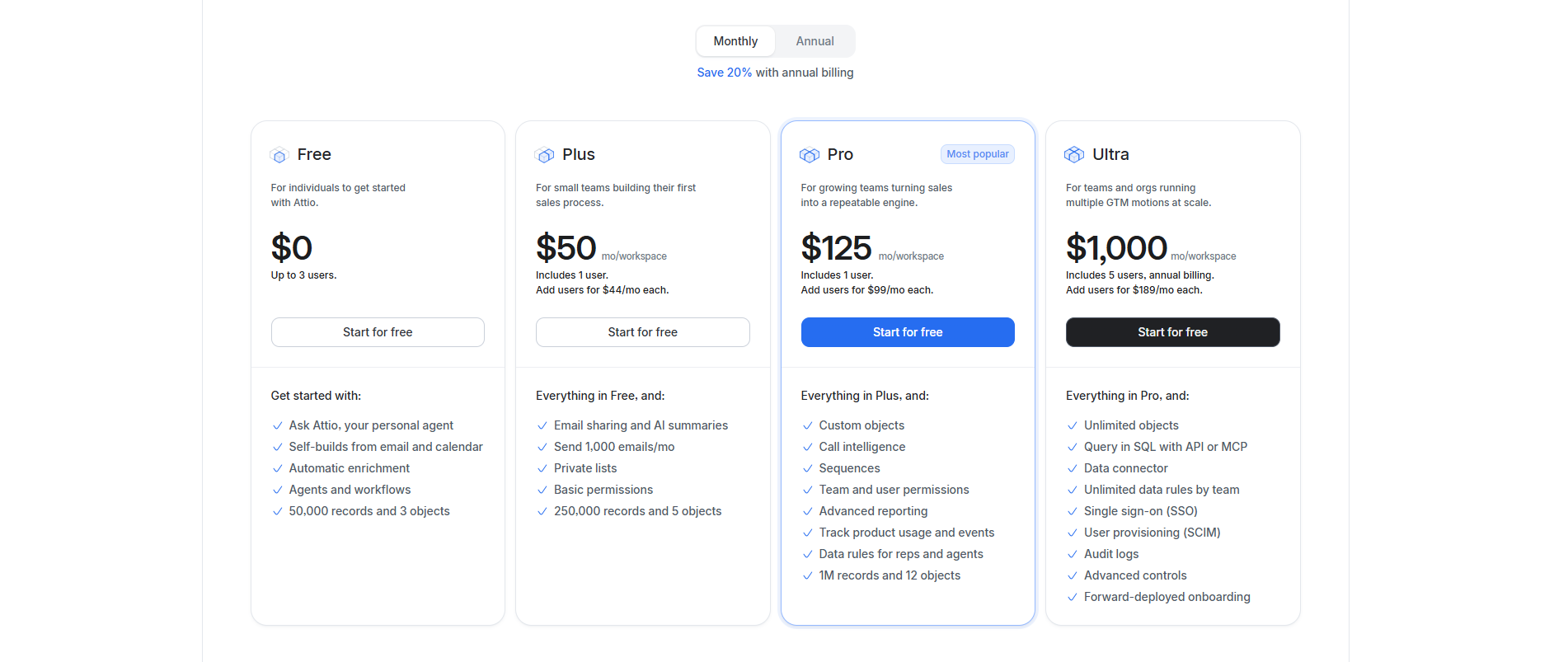
Attio works on a credit system. Each person gets a personal monthly allowance for Ask Attio, plus separate credits for the shared workspace.
- Free Plan: You can use 350 AI credits and add up to 50k records for free.
- Plus Plan: It costs $50 per month and $40 if you buy the annual subscription. The credit limit is 2000, but you can buy more if you run out.
- Pro Plan: It costs $125 per month, offering 11k credits, 1000k records, and unlimited storage.
- Ultra: It costs $1000 per month, offering over 20k credits and access to all the features.
You can try premium features for free.
Verdict
Pipedrive and Attio’s pricing models are slightly different.
Pipedrive is more affordable but places a limit on active deals and leads.
Attio is more generous with deals and leads, but it gives you limited AI credits.
Check their package details before making your purchase decision.
Pipedrive Vs. Attio: Pros And Cons
Pipedrive and Attio both have their strong and weak points. If one makes things simple for you, the other gives you more options.
Here are some of their strengths and limitations.
Pipedrive
Pros
- It’s quick to set up and easy to navigate.
- The pipeline management function is more mature compared to Attio. It’s also more straightforward.
- A wide range of integrations is available. You can connect it to 500+ third-party tools.
Cons
- It’s designed for sales processes only. For businesses with complex needs, Pipedrive might be a bit restrictive.
- Automation and customization are limited compared to Attio.
- Some essential features, like lead generation and project management, are not included in the core package. They are sold separately as add-ons.
Attio

Pros
- Highly flexible data model. You can customize contact details, pipelines, and the dashboard.
- AI and automation are deeply integrated into the system. You can automate data, activities, and outreach campaigns.
- It offers a free plan.
Cons
- Since it lets you build your own workflows, the initial setup might take some time.
- You can only connect Gmail and Outlook with Attio. Pipedrive supports more email providers, like Yahoo and iCloud.
- Third-party integrations are limited compared to Pipedrive.
Pipedrive Vs. Attio: FAQs
Which CRM is Better For Small Businesses?
Pipedrive. It provides traditional sales pipeline and tracking tools, making it easier to track deals and follow-ups. Attio is great for startups or growing companies that want to build their own workflows.
Which CRM offers a free plan?
Attio. It offers a free plan for three users and around 50k records. Pipedrive provides a free trial instead. You don’t have to give credit card details to take the free trial.
Which CRM lets you manage multiple sales pipelines?
Pipedrive. You can create as many sales pipelines as you want for different products. Attio also supports multiple pipelines, but Pipedrive is purpose-built for sales.
Which one is better at scaling?
Attio. You can create flexible data models and advanced workflows as you grow. Pipedrive also offers scalable solutions, but it’s more rigid.
Can non-technical users customize Pipedrive or Attio?
Yes. You don’t need coding to customize Pipedrive or Attio’s sales processes. You’ll only need technical knowledge for advanced integrations.
Conclusion: Pipedrive Vs. Attio, Which CRM Should You Choose?
The best choice comes down to how much control you want and whether you are willing to pay for it.
Some businesses want a hassle-free solution that saves time and effort. Some want more freedom to manage the data their way.
Before you decide, ask yourself this.
Do you prefer a ready-made system, or do you want to customize your processes?
Choose Attio if you’re a startup or a growing company and want to build your own workflows. It’s more expensive than Pipedrive, but less complex than enterprise-grade tools, and you can try the custom workflows for free.
Choose Pipedrive if you are a small business and want ready-to-use visual pipelines and a quick setup. You can take a 30-day free trial to test the premium features.


 A better way to manage projects and clients for freelancers
 Get through busy days like a breeze with Reclaim.ai